# Clinia Platform
A composable health data platform for ingesting, governing and searching clinical data.
Clinia is a composable health platform. It lets you ingest and govern health data from many sources, and power search and retrieval experiences over a single governed layer.
## Data Fabric
The foundation of the platform. Ingest, normalize, and govern data from multiple sources into a single, queryable layer with built-in master data management and entity resolution.
Understand profiles, relationships, partitions, and the building blocks of the Health Data Fabric.
Unify records across sources, resolve entity duplicates, and maintain a governed golden record.
Configure processors, run historical imports, and manage the flow of data into the platform.
Understand the retrieval stack, ranking controls, and when to use semantic or hybrid search.
# Authentication
Learn how to authenticate with Clinia's API using API keys.
The Clinia API uses an API Key to authenticate requests.
If you don't already have an API key, reach out to Clinia's support team at support@clinia.com.
API Keys can also be generated through the system. See [Users and Service Accounts](/iam/users) for more details.
Your API keys carry many privileges, so be sure to keep them secure. Don't share your secret API keys in publicly accessible areas such as GitHub, client-side code, and so forth.
Authentication to the API is performed with HTTP Headers. Provide your API key in the headers with an `X-Clinia-API-Key` key.
You must make all API calls over HTTPS. Calls that you make over plain HTTP will fail. API requests without authentication will also fail.
# Concepts
Understanding clinical concepts as the fundamental units of terminology in Clinia
# Concepts
A **concept** represents a single clinical idea or entity within a [vocabulary](/explanation/vocabularies). Each concept has a unique code within its vocabulary and includes human-readable descriptions, making it the fundamental building block of clinical terminologies.
## What is a Concept?
Concepts are the individual units of meaning within terminology systems. They represent specific clinical ideas, such as diseases, procedures, medications, or observations, in a standardized and machine-readable format.
**Core characteristics:**
- **Unique identification**: Each concept has a unique code within its vocabulary
- **Human-readable**: Includes display text and definitions for clinical users
- **Multilingual support**: Can include translations and alternative names
## Concept Structure
A concept in Clinia contains the following properties:
| Property | Type | Description |
|----------|------|-------------|
| `vocabularyKey` | [`code`](/explanation/data-types/base-types#code-code) | Identifier of the containing vocabulary (read-only, provided as a URL parameter) |
| `code` | [`code`](/explanation/data-types/base-types#code-code) | Unique identifier within the vocabulary (read-only) |
| `definition` | [`symbol`](/explanation/data-types/base-types#symbol-symbol) | Detailed explanation of the concept's clinical meaning |
| `designation` | [`object`](/explanation/data-types/base-types#object-object) | Alternative names and translations in different languages |
**Example concept:**
```json
{
"code": "44054006",
"definition": "A form of diabetes mellitus characterized by insulin resistance and relative insulin deficiency",
"designation": {
"en": "Type 2 diabetes mellitus",
"fr": "Diabète de type 2",
"es": "Diabetes mellitus tipo 2"
}
}
```
## Managing Concepts
### Creating a Concept
Use the [upsert concept endpoint](/api-reference/terminology/vocabularies/upsert-a-concept-in-a-vocabulary) to create or update concepts:
```bash
curl -X PUT "https://$CLINIA_WORKSPACE/terminology/v1/vocabularies/{vocabularyKey}/concepts/{conceptCode}" \
-H "X-Clinia-API-Key: $CLINIA_TOKEN" \
-H "Content-Type: application/json" \
-d '{
"definition": "A chronic metabolic disorder characterized by high blood glucose levels",
"designation": {
"en": "Diabetes mellitus",
"fr": "Diabète sucré"
}
}'
```
### Retrieving Concepts
Get specific concepts by their code:
```bash
curl -X GET "https://$CLINIA_WORKSPACE/terminology/v1/vocabularies/{vocabularyKey}/concepts/{conceptCode}" \
-H "X-Clinia-API-Key: $CLINIA_TOKEN"
```
### Searching Concepts
Use the [concept query endpoint](/api-reference/terminology/vocabularies/search-for-concepts-in-the-terminology) to perform concept resolution, using Clinia's [operators](/explanation/operator) and semantic [search](/explanation/search) capabilities:
```bash
curl -X POST "https://$CLINIA_WORKSPACE/terminology/v1/vocabularies/*/concepts/query" \
-H "X-Clinia-API-Key: $CLINIA_TOKEN" \
-H "Content-Type: application/json" \
-d '{
"query": {
"match": {
"designation.en": {
"value": "diabetes",
"type": "word"
}
}
}
}'
```
### Bulk Operations
Efficiently manage large sets of concepts using [bulk operations](/api-reference/terminology/vocabularies/bulk-upsert-update-or-delete-concepts):
```bash
curl -X POST "https://$CLINIA_WORKSPACE/terminology/v1/vocabularies/{vocabularyKey}/concepts/bulk" \
-H "X-Clinia-API-Key: $CLINIA_TOKEN" \
-H "Content-Type: application/json" \
-d '{
"operations": [
{
"action": "UPSERT",
"upsert": {
"code": "123456789",
"definition": "Example clinical concept",
"designation": {
"en": "Example Concept"
}
}
}
]
}'
```
## Concept Validation
Concepts are central to field validation at Clinia.
_Learn how to do [vocabulary-based validation](/explanation/field-validation/vocabulary) here._
## Related Concepts
Learn about the containers that organize concepts into terminology systems
Understand the major terminology standards and their concept structures
See how concepts are represented in FHIR data structures
Explore how concepts enable clinical data validation
---
**Ready to work with concepts?** Start with the [Concept API reference](/api-reference/terminology/vocabularies/upsert-a-concept-in-a-vocabulary) to manage your clinical concepts.
# Error Codes and Types
Common error codes and types returned by Clinia's API.
| Error Code | Meaning |
| :--------- | :------------------------------------------------------------------------------------------------------------------------------------------------ |
| `400` | Indicates that the server cannot process the request due to a malformed request. |
| `401` | Indicates that the request has not been completed due to its lack of valid authentication credentials for the requested resource. |
| `403` | Indicates that the server understands the request but the provided credentials do not have sufficient authorizations on the given resource. |
| `404` | Indicates that the requested resource does not exist. |
| `409` | Indicates a request conflict with the current state of the target resource. This can happen when trying to create a resource that already exists. |
| `500` | Indicates that the server encountered an unexpected condition that prevented it from fulfilling the request. |
| `501` | Indicates that the server does not support the functionality required to fulfill the request. |
| Error Type | Meaning |
| :------------------- | :-------------------------------------------------------------------------------------------------------------------------------------------------------------------------------------------------------------------------- |
| `ALREADY_EXISTS` | The resource with the provided ID already exists in the system. |
| `FAILED_PRECONDITION`| The operation was rejected because the system is not in a state required for the operation's execution. |
| `INTERNAL` | Internal error. |
| `INVALID_ARGUMENT` | The caller specified an invalid argument. Note that this differs from FAILED_PRECONDITION. INVALID_ARGUMENT indicates arguments that are problematic regardless of the state of the system (e.g., a malformed file name). |
| `NOT_FOUND` | The given ID does not correlate to an existing resource in the system. |
| `OUT_OF_RANGE` | The operation was attempted past the valid range. |
| `UNIMPLEMENTED` | The operation is not implemented or is not supported/configured in this service. |
| `PERMISSION_DENIED` | The caller does not have permission to execute the specified operation. |
| `UNAUTHENTICATED` | The request does not have valid authentication credentials for the operation. |
# Operators
Understand how Clinia's operators enable precise search and filtering across the platform
# Operators
Operators are the fundamental building blocks of Clinia's filtering and selection language, enabling you to define conditions that records must satisfy across various platform features.
Whether you are working with resources or relationships, operators provide a unified interface for expressing complex logic when **searching**, **filtering**, or **validating** records throughout your data workflows.
## Understanding Operators
Operators in Clinia work by defining conditions that records must satisfy to be selected for a particular operation. Whether you're searching for specific records, configuring conditional ingestion steps, setting up field validation rules, or filtering data for processing, operators provide the precise control you need. Each operator is designed for specific data types and use cases, from simple equality checks to complex semantic similarity matching.
## Where Operators Are Used
Operators are currently used in two main areas of the Clinia platform:
### Data Partition API
- **Record filtering**: Filter and retrieve specific records from data partitions (resources or relationships)
- **Transactional queries**: Define precise selection criteria for search operations
- **Hybrid Search queries**: Combine different matching strategies (semantic, lexical)
### Registry API
- **Data quality rules**: Define validation criteria that fields must satisfy
- **Conditional processing**: Apply transformations only when records meet specific criteria
- **Pipeline routing**: Determine which processing steps to execute based on record properties
### Operator Categories
Clinia's operators fall into several categories based on their purpose:
| Category | Purpose | Operators | Use Cases |
|----------|---------|-----------|-----------|
| **[Comparison](#comparison-operators)** | Test numerical, date or code value relationships | `eq`, `lt`, `gt` | Status checks, date ranges, numerical thresholds |
| **[Collection](#collection-operators)** | Work with arrays and multiple values | `any`, `all` | Multi-select filters, requirement validation |
| **[Text Search](#text-search-operators)** | Handle textual content with various matching strategies | `match` | Full-text search, content filtering |
| **[Semantic](#semantic-operators)** | Enable AI-powered dense vector similarity matching | `knn` | Semantic search, hybrid search |
| **[Spatial](#spatial-operators)** | Support location-based filtering | `geoDistance` | Proximity searches, geographic boundaries |
| **[Logical](#logical-operators)** | Combine multiple conditions | `and`, `or`, `not` | Complex filtering logic, condition composition |
| **[Composite](#composite-operators)** | Apply conditions within nested data structures | `composite` | Related data queries, nested filtering |
## Comparison Operators
### Equal (`eq`)
Tests if a property has the same value or some equivalence. Supports case-insensitive matching for symbol types and wildcard matching.
**Supported Data Types**: [Text Types](/explanation/data-types/base-types#text-and-string-types), [Temporal Types](/explanation/data-types/base-types#temporal-types), [Integer](/explanation/data-types/base-types#numerical-types), [Decimal](/explanation/data-types/base-types#numerical-types), [Boolean](/explanation/data-types/base-types#boolean-boolean), [Geographic Types](/explanation/data-types/base-types#geopoint-geopoint)
```json
{
"eq": {
"propertyKey": "value"
}
}
```
**Examples**:
```json
// Exact match
{
"eq": {
"status": "active"
}
}
// Wildcard for existence check
{
"eq": {
"email": "*"
}
}
// Partial wildcard match
{
"eq": {
"name": "John*"
}
}
```
The wildcard `*` tag is a powerful tool for matching any value, including empty strings. It can be used to check if a field exists or to match any value that starts with a specific prefix.
### Less Than (`lt`)
Tests if a property has a value lower than the specified value. Only works with comparable data types.
**Supported Data Types**: [Text Types](/explanation/data-types/base-types#text-and-string-types) (`symbol`, `code`, `markdown`), [Temporal Types](/explanation/data-types/base-types#temporal-types) (`date`, `datetime`, `time`, `instant`), [Numeric Types](/explanation/data-types/base-types#numerical-types) (`integer`, `decimal`)
```json
{
"lt": {
"propertyKey": "value"
}
}
```
**Examples**:
```json
// Date comparison
{
"lt": {
"createdAt": "2024-01-01T00:00:00Z"
}
}
// Numerical comparison
{
"lt": {
"age": 65
}
}
```
### Greater Than (`gt`)
Tests if a property has a value greater than the specified value. Only works with comparable data types.
**Supported Data Types**: [Text Types](/explanation/data-types/base-types#text-and-string-types) (`symbol`, `code`, `markdown`), [Temporal Types](/explanation/data-types/base-types#temporal-types) (`date`, `datetime`, `time`, `instant`), [Numeric Types](/explanation/data-types/base-types#numerical-types) (`integer`, `decimal`)
```json
{
"gt": {
"propertyKey": "value"
}
}
```
**Examples**:
```json
// Find recent records
{
"gt": {
"lastModified": "2024-08-01T00:00:00Z"
}
}
// Numerical threshold
{
"gt": {
"score": 75.5
}
}
```
## Collection Operators
### Any (`any`)
Tests if a property contains any of the given values. Uses equality (`eq`) operator for each value.
**Supported Data Types**: [Text Types](/explanation/data-types/base-types#text-and-string-types), [Temporal Types](/explanation/data-types/base-types#temporal-types), [Integer](/explanation/data-types/base-types#numerical-types), [Decimal](/explanation/data-types/base-types#numerical-types), [Boolean](/explanation/data-types/base-types#boolean-boolean), [Geographic Types](/explanation/data-types/base-types#geopoint-geopoint), [Array Types](/explanation/data-types/base-types#array-array)
```json
{
"any": {
"propertyKey": ["value1", "value2", "value3"]
}
}
```
**Example**:
```json
{
"any": {
"specialties": ["Cardiology", "Internal Medicine", "Family Medicine"]
}
}
```
The `any` operator is inclusive and will return true if any of the specified values are found within the property. This means that if the property is an array, it will check each element for a match. The `any` operator therefore checks for **partial** intersection for array datatypes.
### All (`all`)
Tests if an enumerable property contains all of the given values. Uses equality comparison for each value.
**Supported Data Types**: [Text Types](/explanation/data-types/base-types#text-and-string-types), [Temporal Types](/explanation/data-types/base-types#temporal-types), [Integer](/explanation/data-types/base-types#numerical-types), [Decimal](/explanation/data-types/base-types#numerical-types), [Boolean](/explanation/data-types/base-types#boolean-boolean), [Geographic Types](/explanation/data-types/base-types#geopoint-geopoint), [Array Types](/explanation/data-types/base-types#array-array)
```json
{
"all": {
"propertyKey": ["value1", "value2"]
}
}
```
**Example**:
```json
{
"all": {
"requiredCertifications": ["CPR", "BLS"]
}
}
```
Contrary to the `any` operator, the `all` operator checks for **complete** intersection for array datatypes.
## Text Search Operators
### Match (`match`)
Performs full-text matching on symbol data types with multiple matching strategies and optional fuzziness. Useful for flexible text-based filtering across search, validation, and processing scenarios.
**Supported Data Types**: [Text Types](/explanation/data-types/base-types#text-and-string-types) (`symbol`)
```json
{
"match": {
"propertyKey": {
"value": "search text",
"type": "word|wordPrefix|phrase|phrasePrefix",
"fuzziness": 0
}
}
}
```
**Match Types**:
- `word`: Matches text that contain the query (order independent)
- `wordPrefix`: Matches text that start with the query (order independent)
- `phrase`: Matches text in the exact order specified
- `phrasePrefix`: Matches text in order with the last word as a prefix
Fuzziness controls how many single-character edits (insertions, deletions, substitutions, or transpositions) are tolerated while still considering a token a match. The [possible values](/api-reference/data-partition/search/search-resources-of-a-specific-collection-in-the-data-partition#request-body) are:
- `0` - No typos allowed; use for IDs, exact names, or when precision is critical.
- `1` - Allows one typo per token; good default for short queries that may include minor misspellings.
- `2` - Allows two typos per token; increases recall for longer queries with potential misspellings.
- `3` - Maximum tolerance; use for long queries where errors are more likely, acknowledging reduced precision.
**Examples**:
```json
// Word search
{
"match": {
"description": {
"value": "diabetes treatment",
"type": "word"
}
}
}
// Phrase search with fuzziness
{
"match": {
"title": {
"value": "chest pain symptoms",
"type": "phrase",
"fuzziness": 1
}
}
}
```
## Semantic Operators
### KNN (`knn`)
Performs k-nearest neighbor matching using vector embeddings for semantic similarity. Essential for AI-powered content matching, recommendation systems, and intelligent record selection.
**Supported Data Types**: Vector fields (created by [vectorizer processors](/explanation/ingestion-pipeline/built-in-processors#vectorizer))
```json
{
"knn": {
"vectorPropertyKey": {
"value": "semantic query text"
}
}
}
```
**Example**:
```json
{
"knn": {
"content.chunks.vector": {
"value": "cardiac symptoms and chest pain"
}
}
}
```
You do not have to specify model at query time. The system will automatically use the model associated with the enriched vector field, ensuring semantic consistency.
## Spatial Operators
### Geo Distance (`geoDistance`)
Tests if a geopoint lies within a specified radius, in meters, from a given location. Supports both coordinate objects and string representations.
**Supported Data Types**: [Geographic Types](/explanation/data-types/base-types#other-primitive-types) (`geopoint`)
```json
{
"geoDistance": {
"propertyKey": {
"coordinates": {
"latitude": 45.0,
"longitude": -73.0
},
"radius": 20000
}
}
}
```
**Examples**:
```json
// Using coordinate object
{
"geoDistance": {
"location": {
"coordinates": {
"latitude": 45.5017,
"longitude": -73.5673
},
"radius": 10000
}
}
}
// Using string coordinates
{
"geoDistance": {
"position": {
"coordinates": "45.5017,-73.5673",
"radius": 5000
}
}
}
```
## Logical Operators
### And (`and`)
Combines multiple operators where all conditions must be true. Acts as a logical AND junction.
```json
{
"and": [
{ "eq": { "status": "active" } },
{ "gt": { "age": 18 } }
]
}
```
### Or (`or`)
Combines multiple operators where at least one condition must be true. Acts as a logical OR junction.
```json
{
"or": [
{ "eq": { "department": "Cardiology" } },
{ "eq": { "department": "Emergency" } }
]
}
```
### Not (`not`)
Negates another operator, returning records that do NOT match the specified condition.
```json
{
"not": {
"eq": {
"status": "inactive"
}
}
}
```
## Composite Operators
### Composite (`composite`)
Applies multiple operators within a specific nested data structure or traversed property path. Essential for querying related data without joins.
```json
{
"composite": {
"nestedPropertyPath": [
{ "eq": { "nestedPropertyPath.field1": "value1" } },
{ "gt": { "nestedPropertyPath.field2": 100 } }
]
}
}
```
**Example**:
```json
{
"composite": {
"resources.observation": [
{
"eq": {
"resources.observation.patientId.value": "PAT-12345"
}
},
{
"eq": {
"resources.observation.status": "final"
}
}
]
}
}
```
## Platform Integration Examples
### Data Partition API - Record Filtering
Using operators to filter records in data partition queries:
```json
{
"filter": {
"and": [
{
"eq": {
"status": "active"
}
},
{
"gt": {
"lastModified": "2024-01-01T00:00:00Z"
}
}
]
}
}
```
### Registry API - Field Validation
Defining validation rules for data fields:
```json {collectForTests=profile}
{
"properties": {
"name": {
"type": "symbol"
},
"practiceNumber": {
"type": "integer"
},
"specialities": {
"type": "array",
"rules": [
{
"required": true,
"min": 1,
"when": {
"eq": {
"practiceNumber": "*" // Wildcard to test for the presence of a value
}
}
}
// Additional rules can be specified here (they can also contain their own `when` clauses)
],
"items": {
"type": "symbol"
}
}
}
}
```
See [Field Validation](/explanation/field-validation/advanced#conditional-rules) for more details.
### Registry API - Ingestion Pipeline Conditions
Applying conditional logic in data processing pipelines:
```json
{
"steps": [
{
"type": "VECTORIZER",
"vectorizer": {
"inputProperty": "description",
"modelId": "text-embedding-004",
"propertyKey": "vector",
"provider": "google",
"dimensions": 768
},
"trigger": {
"type": "OPERATOR_TRIGGER",
"operator": {
"and": [
{
"eq": {
"status": "published"
}
},
{
"gt": {
"lastModified": "2024-01-01T00:00:00Z"
}
}
]
}
}
}
]
}
```
See [Triggers](/explanation/ingestion-pipeline/basics#triggers) for more details.
### Data Partition API - Search
Combining semantic and exact matching operators for comprehensive filtering.
For more details, see the [Search API documentation](/explanation/search).
```json
{
"and": [
{
"or": [
{
"knn": {
"specialties.vector": {
"value": "cardiac rehabilitation"
}
}
},
{
"match": {
"name.given": {
"value": "Dr. Smith",
"type": "wordPrefix"
}
}
}
]
},
{
"geoDistance": {
"location": {
"coordinates": {
"latitude": 45.5017,
"longitude": -73.5673
},
"radius": 25000
}
}
}
]
}
```
## Related Concepts
Understanding supported data types for each operator
Using operators in search queries
Applying operators in processing pipelines
# Search Parameters
Understand how to structure and use search parameters for comprehensive querying in Clinia's Data Partition API
## Clinia Query Domain-Specific Language (DSL)
Search parameters define how to query and retrieve records from Clinia's data partitions. They provide comprehensive control over filtering, aggregation, and result presentation, enabling everything from simple lookups to complex multi-modal searches across your data.
The [registry API search endpoints](/api-reference/registry/search/search-accross-resource-or-relationship-collections-in-the-registry) and [Data Partition API search endpoints](/api-reference/data-partition/search/search-resources-of-a-specific-collection-in-the-data-partition) accept a single JSON-like object that controls all aspects of your search query.
**Unified Query DSL**: Both [resources](/explanation/data-model/data-sources#resources) and [relationships](/explanation/data-model/data-sources#relationships) use the same DSL and search parameters, even though they have distinct API endpoints. You can search [resources](/api-reference/data-partition/search/search-resources-of-a-specific-collection-in-the-data-partition) and [relationships](/api-reference/data-partition/search/search-relationships-of-a-specific-type-in-the-data-partition) using identical query syntax and parameters.
## Core Search Parameters
The foundation of every search request lies in these core parameters that control what data to retrieve and how to match it.
### Filtering
Use for **exact matching** and **precise filtering**. Creates binary include/exclude decisions without affecting relevance scores.
Perfect for status checks, date ranges, and categorical filters. Optimized for fast boolean operations.
```json title="Example: Status and Date Filtering"
{
"filter": {
"and": [
{ "eq": { "status": "active" } },
{ "gt": { "lastModified": "2024-01-01T00:00:00Z" } }
]
}
}
```
### Query
Use for **relevance-based matching** and **content discovery**. Contributes to relevance scoring of results.
Ideal for text search, semantic matching, and finding the most relevant content. Designed for scoring.
```json title="Example: Text and Semantic Search"
{
"query": {
"or": [
{
"match": {
"description": {
"value": "cardiac symptoms",
"type": "phrase"
}
}
},
{
"knn": {
"content.vector": {
"value": "heart condition treatment"
}
}
}
]
}
}
```
Both `filter` and `query` accept any [operator](/explanation/operator) and can be combined in the same search request for hybrid filtering and scoring strategies.
## Sorting
Control the order of your search results with these parameters.
Apply explicit sorting independent of relevance scoring. Useful for chronological or alphabetical ordering.
```json title="Example: Sort by Date"
{
"sort": {
"path": "lastModified",
"direction": "DESC"
}
}
```
**Sort Directions**:
- `ASC` (ascending)
- `DESC` (descending, default)
## Result Enhancement
Enhance your search results with additional context and related data.
### Highlighting
Request highlighted snippets for specific properties to show query matches in search results.
Perfect for showing users **why** a result matched their query and which parts are most relevant.
```json
{
"highlighting": [
"title",
"description",
"content.chunks.text"
]
}
```
```json
{
"highlighting": {
"description": [
{
"type": "textual",
"highlight": "Treatment for cardiac conditions..."
}
],
"content.vector": [
{
"type": "vector",
"score": 0.89,
"path": "content.chunks.vector",
"data": "Advanced cardiac rehabilitation techniques..."
}
]
}
}
```
### Traversed Properties
Include data from connected resources linked by relationships without separate API calls. Essential for comprehensive result context.
```json title="Example: Include Related Data"
{
"traversedProperties": [
"@worksAt.*",
"@worksAt.@location.address",
"@treatedBy.name.given"
]
}
```
**Traversed Property Path Syntax**:
- `*`: Return all traversed properties
- `@relationshipType.*`: All properties from a specific relationship
- `@relationshipType.@adjacentType.property`: Specific properties from chained relationships
## Aggregations
Generate summary statistics and faceted navigation data alongside search results. Build powerful filter interfaces and analytics.
Aggregations can help you surface your data distribution and available filter options.
Aggregations are also referred to as **facets** in the search domain.
### Lexical Aggregation
Count and group records by discrete property values to create filter options and understand data patterns.
```json tab="Example: Aggregate by Specialty"
{
"aggregations": [
{
"type": "LEXICAL",
"path": "specialty",
"size": 10,
"prefix": "card"
}
]
}
```
```json tab="Response: Aggregation Results"
{
"aggregates": [
{
"type": "LEXICAL",
"path": "specialty",
"aggregate": [
{ "value": "Cardiology", "count": 45 },
{ "value": "Cardiac Surgery", "count": 12 }
]
}
]
}
```
**Lexical Aggregation Parameters**:
| Parameter | Type | Description |
|-----------|------|-------------|
| `path` | string | Property to aggregate on |
| `size` | integer | Maximum unique values to return (default: 20) |
| `prefix` | string | Optional filter to narrow aggregation values |
## Pagination
Zero-based page number for result pagination. Use with `perPage` to navigate through large result sets.
Number of results per page (1-250). Balance between performance and user experience needs.
```json title="Example: Second Page with 50 Results"
{
"page": 1,
"perPage": 50
}
```
**Limits**: `perPage` supports 1-250 results, while `page` starts from 0 and has no pre-defined limit.
## Search Patterns
Common search patterns and real-world examples to get you started quickly.
Simple filtering combined with text matching for straightforward queries over a single collection.
```json tab="Profile"
{
"properties": {
"name": {
"type": "humanname"
},
"status": {
"type": "code",
"description": "State of the patient file",
"binding": {
"vocabulary": {
"key": "patient-status",
"strength": "required"
}
}
}
}
}
```
```json tab="Search Parameters"
{
"filter": {
"eq": { "status": "active" }
},
"query": {
"match": {
"name.family": {
"value": "Smith",
"type": "wordPrefix"
}
}
},
"perPage": 10
}
```
Combine keyword matching with vector similarity search for comprehensive coverage and intelligent results. Use [`knn`](/explanation/operator#knn-knn) for semantic matching.
```json
{
"filter": {
"eq": { "resourceType": "practitioner" }
},
"query": {
"or": [
{
"match": {
"specialties.name": {
"value": "cardiology pediatric",
"type": "phrase"
}
}
},
{
"knn": {
"specialties.vector": {
"value": "pediatric cardiology specialist"
}
}
},
{
"match": {
"bio": {
"value": "children heart specialist",
"type": "word"
}
}
}
]
}
}
```
Build faceted navigation interfaces with [aggregations](/explanation/search#aggregations) and location filtering. Faceted search helps users discover and refine results by showing available filter options with counts.
**Pre-computed Facets**: You can pre-compute facet values for commonly used filters and integrate them into your interface for improved performance and user experience. This allows dynamic filter interfaces that update in real-time whenever your data changes, or depending on the [query](/explanation/search#query).
```json
{
"filter": {
"geoDistance": {
"location": {
"coordinates": { "latitude": 45.5, "longitude": -73.6 },
"radius": 25000
}
}
},
"aggregations": [
{
"type": "LEXICAL",
"path": "specialty",
"size": 15
},
{
"type": "LEXICAL",
"path": "acceptingPatients",
"size": 5
}
],
"highlighting": ["name.given", "name.family"]
}
```
Search across multiple resource types ([resources](/explanation/data-model/data-sources#resources) and [relationships](/explanation/data-model/data-sources#relationships)) in a single query.
**Important**: When searching across multiple resource types, notice how the paths differ:
- Use `resources.practitioner.property` for practitioner data
- Use `resources.organization.property` for organization data
Each resource type requires its own path prefix in composite queries. This also allows to query relationships and resources in the same API call.
```json
{
"query": {
"or": [
{
"knn": {
"resources.practitioner.specialties.vector": {
"value": "cardiology"
}
}
},
{
"knn": {
"resources.clinics.specialties.vector": {
"value": "cardiology"
}
}
}
]
}
}
```
Use traversed properties selectively based on result types for dynamic data inclusion.
```json
{
"query": {
"any": {
"resourceType": ["practitioner", "organization"]
}
},
"traversedProperties": [
"@worksAt.*",
"@employs.*",
"@affiliatedWith.name"
]
}
```
Use composite operators for deep property filtering across nested data structures.
```json
{
"filter": {
"and": [
{
"composite": {
"address": [
{
"eq": {
"address.city": "Montreal"
}
},
{
"eq": {
"address.postalCode": "H3*"
}
}
]
}
},
{
"any": {
"qualifications": ["MD", "DO", "MBBS"]
}
}
]
}
}
```
## Related Concepts
Complete reference for filter and query conditions
Understanding property types for accurate filtering
Complete endpoint documentation
# Vocabularies
Understanding vocabularies as containers for clinical terminology concepts in Clinia
# Vocabularies
A **vocabulary** is a collection of related clinical concepts organized under a specific terminology system. In Clinia, vocabularies serve as containers that group [concepts](/explanation/concepts) from the same standard or organization.
## What is a Vocabulary?
Vocabularies provide the organizational structure for terminology systems, ensuring that related clinical concepts are grouped together logically. They act as the top-level containers in Clinia's terminology hierarchy.
**Key characteristics:**
- **Unique identifier**: Each vocabulary has a unique key (e.g., `snomed-ct`, `icd-10`)
- **Metadata**: Includes title, description, and version information
- **Scope**: Contains concepts from a single terminology system
- **Management**: Can be standard (SNOMED CT, ICD, LOINC) or custom organizational vocabularies
## Vocabulary Structure
A vocabulary in Clinia contains the following properties:
| Property | Type | Description |
|----------|------|-------------|
| `key` | `string` | Unique identifier for the vocabulary, provided as a URL parameter |
| `title` | `string` | Human-readable name of the vocabulary |
| `description` | `string` | Detailed description of the vocabulary's purpose and scope |
**Example payload:**
```json
{
"title": "SNOMED CT International Edition",
"description": "Systematized Nomenclature of Medicine Clinical Terms - comprehensive clinical terminology covering diseases, procedures, anatomy, and clinical findings"
}
```
## Types of Vocabularies
### Standard Vocabularies
These are established, internationally recognized terminology systems:
- **SNOMED CT**: Comprehensive clinical terminology
- **ICD-10/ICD-11**: International Classification of Diseases
- **LOINC**: Laboratory and clinical observations
- **RxNorm**: Medication terminologies
- **CPT**: Current Procedural Terminology
### Custom Vocabularies
Organizations can create custom vocabularies for:
- **Internal coding systems**: Organization-specific clinical codes
- **Local terminologies**: Regional or specialty-specific concepts
- **Value sets**: Curated subsets of standard terminologies
- **Custom mappings**: Translations between different systems
## Managing Vocabularies
### Creating a Vocabulary
Use the [upsert vocabulary endpoint](/api-reference/terminology/vocabularies/upsert-a-vocabulary-in-the-terminology) to create or update vocabularies:
```bash
curl -X PUT "https://$CLINIA_WORKSPACE/terminology/v1/vocabularies/{vocabularyKey}" \
-H "X-Clinia-API-Key: $CLINIA_TOKEN" \
-H "Content-Type: application/json" \
-d '{
"title": "Custom Clinical Terminology",
"description": "Organization-specific clinical codes and concepts"
}'
```
### Listing Vocabularies
Retrieve all available vocabularies in your workspace:
```bash
curl -X GET "https://$CLINIA_WORKSPACE/terminology/v1/vocabularies" \
-H "X-Clinia-API-Key: $CLINIA_TOKEN"
```
### Bulk Operations
Use [bulk vocabulary operations](/api-reference/terminology/vocabularies/bulk-upsert-or-delete-vocabularies) to efficiently manage multiple vocabularies:
```bash
curl -X POST "https://$CLINIA_WORKSPACE/terminology/v1/vocabularies/bulk" \
-H "X-Clinia-API-Key: $CLINIA_TOKEN" \
-H "Content-Type: application/json" \
-d '{
"operations": [
{
"action": "UPSERT",
"upsert": {
"key": "custom-vocab-1",
"title": "Custom Vocabulary 1",
"description": "First custom vocabulary"
}
}
]
}'
```
## Vocabulary Validation
Vocabularies play a crucial role in [data validation](/explanation/field-validation/vocabulary) by:
- **Providing scope**: Defining which concepts are valid within a specific domain
- **Ensuring consistency**: Maintaining standardized representations across systems
- **Enabling validation rules**: Supporting field validation based on vocabulary membership
## Related Concepts
Learn about the individual clinical concepts within vocabularies
Understand the major terminology standards like SNOMED CT, ICD, and LOINC
Explore how vocabularies enable data validation
Complete API reference for vocabulary management
# Overview
Overview of Clinia's Identity and Access Management (IAM) module, including users, service accounts, roles, and permissions.
Identity and Access Management (IAM) is the framework that governs how users and systems are authenticated and authorized to interact with critical resources. It ensures the right individuals and services have appropriate access, with minimal friction and maximum control.
The Clinia Platform's IAM module provides a flexible and extensible system for managing users, service accounts, roles, and permissions—supporting both system-defined permissions and user-defined policies to manage access with more granularity.
# Overview
How roles work in Clinia IAM, including built-in roles and guidance on assigning and managing role-based access.
In the Clinia platform, roles are a key part of our Identity and Access Management (IAM) system. They define what users or services are allowed to do, ensuring that only authorized entities can access specific resources or perform certain actions. Rather than assigning individual permissions to each user or API client, we group them into roles. This makes managing access easier, safer, and more scalable.
By default, our IAM system includes predefined roles like: `admin` and `reader`.
- The `admin` role has full access to all resources and settings across the platform.
- The `reader` role is read-only, intended for users who need visibility but no modification rights.
While these system-defined roles are built-in and cannot be deleted, you're free to create as many roles as needed to match your organization's access control requirements.
## How to use them
Roles in our IAM system act as a bridge between accounts (users or service accounts) and the permissions they have in the application. Each account is assigned exactly one role at a time, which defines what they are allowed to do. For instance, if a user is given a role called `manager`, they might be able to modify records or manage users but won’t have access to the platform’s configurations or destructive actions.
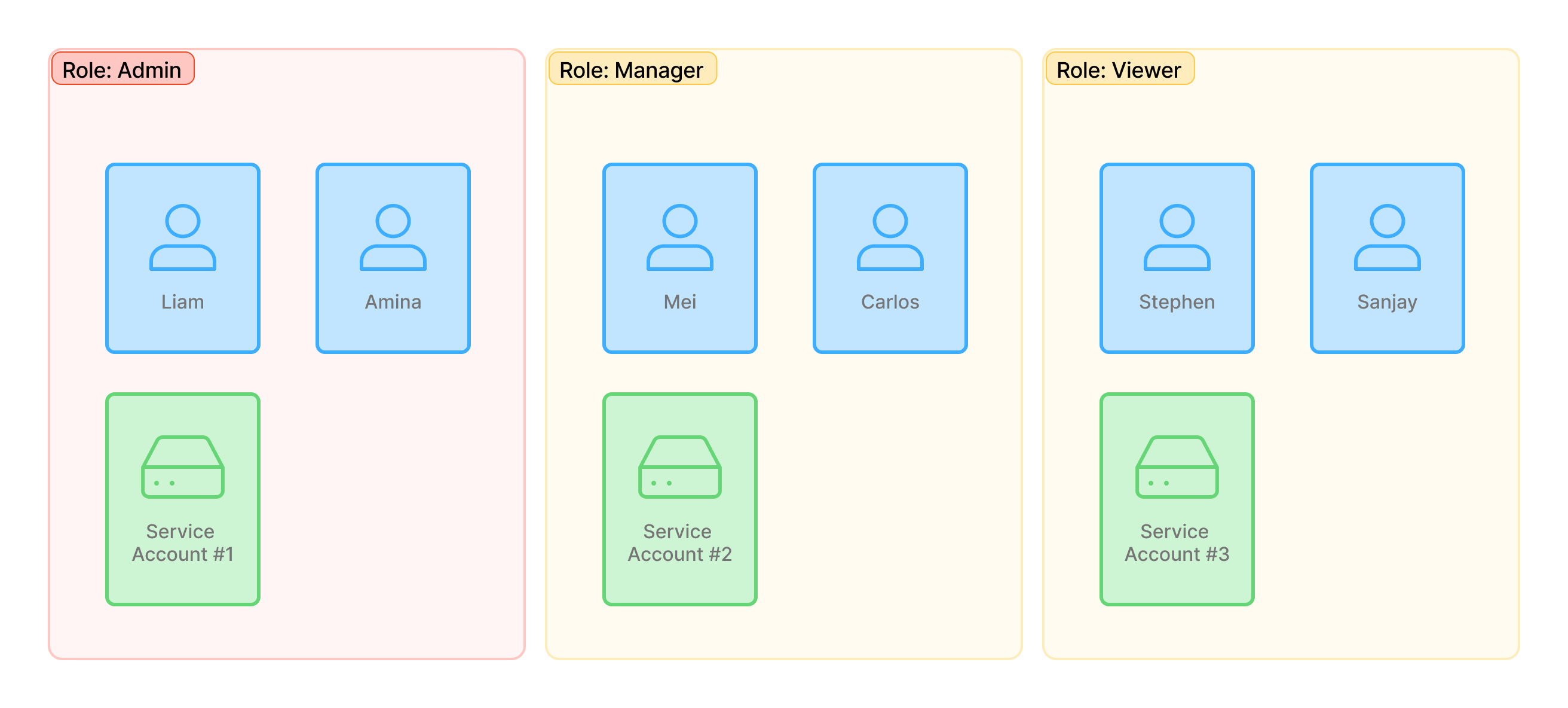
Because roles are shared across identities, any changes to a role’s permissions will impact all users and service accounts assigned to it. For example, if the `viewer` role originally allowed read-only access to records, but is later updated to include access to users, every identity with that role immediately gains that new permission. This makes it easy to scale access management, but also requires careful review before modifying role definitions.
To maintain consistency and prevent accidental access issues, the system prevents deletion of any role that is currently in use by at least one user or service account. Before a role can be deleted, it must first be unassigned from all identities. This ensures there are no dangling references or unexpected permission losses.
# System-Defined Permissions
Predefined permissions that compose roles, with notes on wildcards and when to use user-defined policies for granular access.
# System-Defined Permissions
Permissions define the specific actions an identity can perform within the system—such as viewing, modifying or deleting records. Roles are made up of one or more of these permissions, and they determine what level of access a user or service account will have.
Our system provides a predefined set of permissions that you can assign when creating or updating custom roles. This allows you to build roles that align precisely with your access control needs.
Note: System-defined roles `admin` and `reader` have fixed permission sets. These cannot be modified, ensuring consistent baseline access across environments.
Some permissions in the system include wildcards (e.g., `datasource/{sourceKey}:ListProfiles`), which grant access to all resources of a given type for the specified action. If you need more granular control—such as limiting access to a specific data source—you can define user-defined policies. These policies work in a similar way as permissions and allow you to enforce fine-grained access rules. For details on how to create and manage custom policies, see the [User-Defined Policies](/iam/user-defined-policies) page.
# User-Defined Policies
Fine-grained access controls that constrain system-defined permissions to specific entities like data sources, profiles, or partitions.
# User-Defined Policies
## What Are User-Defined Policies?
User-defined policies allow you to fine-tune access control by specifying exactly which parts of the system an identity can access. While permissions provide broad access (for example, the ability to view all records in the system), user-defined policies let you narrow those permissions to a specific data source, profile, relationship definition, partition, and more. In a way, user-defined policies extend system-defined permissions by adding constraints to limit the scope of access in a more granular way.
This level of control is useful when you need to:
- Allow a user to access only one data source out of many
- Limit editing to a specific relationship type
- Restrict bulk operations to a single resource type or data source
- Control which partitions a team or service account can view
## How It Works
Some permissions in our system follow a structured pattern, like this:
```
"datasource/{sourceKey}:ListProfile"
```
By default, if a user’s role includes this permission, they can list profiles in any data source. With user-defined policies, you can constrain this permission by specifying the entity explicitly. Using the permission above as an example, we could create a policy that only allows user access to list profiles in the data source `source-a`.
Example (JSON):
```json
{
"referencePermission": "datasource/{sourceKey}:ListProfile",
"params": {
"sourceKey": "source-a" // Can only list profiles in "source-a"
}
}
```
If a user with a role containing this policy attempts to list another data source’s profiles (for instance `source-b`) then they will receive an “unauthorized” response.
# Users and Service Accounts
Differences between user accounts and service accounts in Clinia IAM and how they authenticate and access the platform.
# Users and Service Accounts
In the Clinia platform, there exists two types of identities to manage access: Users and Service Accounts. While both are part of our Identity and Access Management (IAM) system, they serve different purposes.
- Users represent real people—like team members or administrators—who log into the platform and use our UI interface to manage data, configure settings, or monitor activity.
- Service Accounts, on the other hand, represent automated systems or applications. They’re used when a program or script needs to connect to our API to send or retrieve data behind the scenes, without using our UI interface.
By separating human and machine access, we can assign the right level of control to each, keep your system secure, and give you the flexibility to automate workflows where needed.
This table summarizes the differences between both Users and Service Accounts:
| Feature | Users | Service Accounts |
| --- | --- | --- |
| Intended for | People | Machines/scripts |
| Interacts with | Admin Portal | API Endpoints |
| Authenticates using | Username and password combination | API Credentials |
| Assigned to a role | ✅ | ✅ |
| Supports user-defined policies | ✅ | ✅ |
| UI Access | ✅ | ❌ |
## Users Account
Users are real people who interact with the system via the Administration Portal. They typically include internal team members, collaborators, or administrators who need a user interface to manage records, service accounts or other users.
Each user is authenticated through Clinia's identity provider and can be assigned a single role, which defines what they can do on the platform.
## Service Accounts (Machine Users)
Key traits of service accounts:
- They can not log into any UI interface
- They authenticate via API credentials (see [API Authentication](/explanation/authentication) if available)
- They are also assigned exactly one role, just like users
Example use cases:
- A data pipeline that syncs new and existing records into a data source daily
- A third-party service that queries partition data through the API
## API Credentials
API Credentials (commonly known as API keys) are secure tokens used to authenticate requests made directly to our API. They allow both users and service accounts to make authenticated API calls to Clinia’s endpoints on their behalf. Each credential is tied to a specific identity (either a user or a service account) and carries the same role-based and policy-based access controls defined for that identity.
It’s important to note that API credentials are tied to an entity. As such, if the role for that entity is modified or the entity itself is deactivated, then the API credentials will also be affected.
# Data Sources
Understand how sources organize resources and relationships before they enter the registry
Clinia data sources are the administrative boundary for everything you ingest into the registry. They capture where a record originates, which schemas it must respect, and how upstream systems are allowed to mutate it. Every workspace can declare multiple sources to mirror each operational system of record you need to consolidate.
## Source fundamentals
Each source is both a contract and a container:
- **Contract** — Sources reference the [profiles](/explanation/data-model/profiles-relationships) and relationship definitions that data must respect. They define which data types, validation rules, and vocabularies are allowed.
- **Container** — Sources persist the raw resources and relationships exactly as they were ingested, including source-specific metadata needed for traceability.
- **Processing boundary** — Pipelines, processors, and validation rules execute per source so that each system can keep autonomous data quality guardrails.
Because all write APIs target a specific source, the registry always tracks provenance and can trace which upstream system produced a given record.
## Resources
A resource is a record stored under a source that conforms to the profile defined by its collection. Resources include:
- **Data** — Properties defined by the associated profile, including nested object and array structures.
- **Meta** — System-managed attributes such as identifiers, timestamps, and ingestion receipts.
- **Contained resources** — Optional embedded structures declared by the profile. They are versioned together with the parent resource and never queried independently.
Resources are one of the units you search, filter, and surface to downstream applications through partitions.
## Relationships
Relationships capture graph structure between resources:
- **Definition** — A relationship definition declares allowed `from`/`to` resource types and the properties carried on each edge.
- **Instances** — Each stored relationship references two resource identifiers, its key (the relationship type), optional data payload, and metadata.
- **Traversal** — Partitions can traverse relationships so that related properties become available for querying without denormalizing data.
Use relationships to express ownership, participation, service availability, or any link that drives navigational queries across datasets.
## Ingesting data into a source
Decide how much coordination each integration requires, then pick the ingestion workflow that matches:
- For batched workloads, use the [bulk resource and relationship APIs](/guides/managing-data/tasks#bulk-resources) so that operations run asynchronously and can retry individual failures.
- When you need atomic guarantees across multiple operations, rely on [bundle requests](/guides/managing-data/tasks#bundle-operations).
- For low-volume or highly targeted writes, the [single resource APIs](/api-reference/registry/resources/create-a-resource-in-the-registry) and [relationship APIs](/api-reference/registry/relationships/create-a-relationship-between-two-resources-in-the-registry) provide synchronous confirmations.
Each ingestion option ultimately writes into the same source boundary, so you can mix strategies per integration without fragmenting your registry.
Understand how to define your data models
Learn how to ingest resources or relationships in bulk
Learn how to group multiple writes in a single transaction
# Partitions
Understand how partitions expose unified data for search and downstream consumption
Partitions are read-optimized views over MDM data from one or more sources. They draw from collections that have gone through entity resolution and reconciliation, delivering deduplicated and normalized records. Each partition declares:
- **Which resources and relationships are exposed** — Each collection entry specifies the property schema and source mappings that describe how MDM output maps to the partition's indexed fields.
- **Reconciliation strategies** — How conflicting attribute values are merged (latest, earliest, aggregated, or custom logic).
- **Cross-source joins** — Unified relationships let you traverse across systems without denormalizing the data first.
- **Traversal rules** — Which related properties can be projected into the query context. Learn how this powers filtering in [Traversed property filters](/guides/search/traversed-property).
- **Governance** — MDM policies ensure that only curated, steward-approved data feeds downstream applications.
## Traversed properties
Traversal rules let you bring attributes from related resources or contained structures into the current query scope. That enables filters such as "clinics that offer a related service with code `cardiology`" without copying data. Traversals are explicit and bounded, which keeps query plans predictable and prevents accidental fan-out.
## Keep exploring
Understand how records are reconciled before hitting downstream apps.
Learn how to project adjacent resource attributes directly into partition search.
# Profiles & Relationships
Understand how to define schemas and validation rules in each source
Profiles are the schema contracts that govern resources under a source. They specify which properties exist, which [data types](/explanation/data-types/base-types) they use, and which validation rules or vocabularies apply. Every resource instance references a profile key, so profiles are the backbone of data quality in the registry.
## Scope and keys
- **Per-source uniqueness** — Profile keys are unique within a source. Two sources can reuse the same key.
- **API usage** — You reference a profile key when writing resources, defining relationships, configuring partitions, or declaring pipelines.
- **Versioning** — Updating a profile changes which data future writes must respect. Existing records remain untouched until revalidated through a pipeline or reingested.
## Properties and validation
Each property declares:
- A type (`symbol`, `integer`, `address`, custom objects, arrays…)
- Optional `rules` for validation (required, min/max, enum, pattern, vocabulary bindings)
- Whether it can repeat (`array`) or embed structured objects (`object`)
Profiles integrate tightly with [field validation](/explanation/field-validation/basic) so that ingestion rejects records that violate the contract.
## Contained resources
Contained profiles let you model complex data without multiplying top-level resources.
### When to use contained profiles
- The component depends entirely on a single parent resource.
- You must allow multiple instances (for example, a clinic with many insurance contracts).
### When not to use contained profiles
- The component should be discoverable on its own (queryable partition collection).
- Multiple parent resources must reference the same record.
- You need graph relationships to or from that component.
In those cases, create a different profile and connect records with relationships instead.
## Example profile
```bash {collectForTests=profileClinic}
curl -X PUT "https://$CLINIA_WORKSPACE/sources/clinics/v1/collections/clinic" \
-H "X-Clinia-API-Key: $CLINIA_TOKEN" \
-H "Content-Type: application/json" \
-d '{
"type": "resources",
"profile": {
"description": "Clinic profile",
"properties": {
"address": {
"type": "address",
"properties": {
"type": {
"type": "code",
"rules": [
{
"enum": [
"postal",
"physical",
"both"
]
}
]
}
}
}
},
"contained": {
"weeklyHoursOfOperation": {
"cardinality": "0:1",
"properties": {
"monday": {
"type": "object",
"properties": {
"open": {
"type": "time",
"rules": [
{
"required": true
}
]
},
"close": {
"type": "time",
"rules": [
{
"required": true
}
]
}
}
},
"tuesday": {
"type": "object",
"properties": {
"open": {
"type": "time",
"rules": [
{
"required": true
}
]
},
"close": {
"type": "time",
"rules": [
{
"required": true
}
]
}
}
}
}
}
}
}
}'
```
This profile:
- Uses the Clinia [`address`](/explanation/data-types/clinia-types#address-address) complex type while layering custom validation.
- Embeds a contained profile to track opening hours without creating an independent resource.
- Keeps ingestion strict by validating enums and required fields.
# Traversed Properties
Learn how to configure traversal rules for your MDM partitions without denormalizing data.
Traversal rules extend a partition’s query surface beyond the fields that physically exist on a resource. When you configure a traversal, you instruct the registry to project specific properties from related resources (or contained structures) into the current query scope. Filters and sorts can then reference those projected paths as if they were native fields.
## Why traverse properties?
- **Targeted filtering** — Ask for “clinics that offer cardiology services” even if the service lives in a separate relationship.
- **Predictable performance** — Traversals are explicit; the registry precomputes the paths so queries stay bounded.
- **Governed exposure** — Only the properties you whitelist become visible, which simplifies access control and schema evolution.
## How traversal works
1. **Declare the traversal** when configuring the partition. You choose:
- The source collection (resource or relationship) you want to project from.
- The path you want to expose (for example, `service.code`).
- Whether the projection should be filterable, sortable, or both.
2. **Reference the projected path** in search requests using the [traversed property notation](/explanation/partitions/mdm-partition#traversed-property-notation)
The registry maintains the projection automatically—no manual denormalization or synchronization is required.
Want to apply traversed paths in real-time queries? Use the [Search guide on traversed filters](/guides/search/traversed-property) for a focused walkthrough.
## Design guidelines
- **Keep traversals purposeful** — Expose only the fields you need for filters or queries. This reduces index size and keeps query plans simple.
- **Avoid deep chains** — Traversing multiple levels increases maintenance costs and may complicate troubleshooting. Flatten data offline if you need more than one hop.
- **Plan for governance** — Align traversed properties with your access policies. If a downstream team should not see a field, omit it from the traversal.
Learn more about partition configuration in the [data partition overview](/explanation/data-model/partitions).
## Keep exploring
Understand the unified context where traversals often operate.
Apply traversed properties to deliver richer search experiences.
# Base Data Types
Explore the primitive and composite types that power Clinia schemas
Clinia defines a comprehensive set of base types that model everything from simple strings to complex nested objects. These primitives guarantee consistent validation, indexing behavior, and processor compatibility across the registry.
Choosing the right base type impacts validation, query performance, and downstream processors. Use the tables and examples below to align schema design with your use cases.
## Primitive Types
Primitive types represent atomic values with specific validation patterns and search capabilities.
### Text and String Types
#### Symbol (`symbol`)
A sequence of Unicode characters for general text content.
```json
{
"name": "Dr. Sarah Wilson",
"description": "Board-certified cardiologist specializing in interventional procedures"
}
```
```regex
^[\s\S]+$
```
**Best for**: Names, descriptions, free-text fields, search content
#### Code (`code`)
A string with specific formatting rules—no leading/trailing whitespace, single spaces only.
```json
{
"status": "active",
"type": "outpatient"
}
```
```regex
^[^\s]+( [^\s]+)*$
```
**Best for**: Status values, controlled vocabularies, coded identifiers, filter values
#### Markdown (`markdown`)
GitHub Flavored Markdown syntax for rich text content.
```json
{
"instructions": "## Pre-procedure Instructions\n\n- Fast for **12 hours**\n- Take medications as prescribed"
}
```
```regex
^[\s\S]+$
```
**Best for**: Documentation, clinical notes, formatted instructions
#### URI (`uri`)
String used to identify a name or a resource within a namespace.
```json
{
"system": "http://terminology.hl7.org/CodeSystem/v3-ActCode",
"namespace": "urn:uuid:53fefa32-fcbb-4ff8-8a92-55ee120877b7"
}
```
```regex
^\S*$
```
**Best for**: System identifiers, namespace identifiers, resource identifiers
#### URL (`url`)
A URI that is a literal web reference.
```json
{
"profileUrl": "https://example.com/patient-profile",
"resourceLink": "https://clinia.com/resource/1234567890"
}
```
```regex
^\S*$
```
**Best for**: Web resources, external references, literal resource links
### Numerical Types
#### Integer (`integer`)
Whole numbers with pattern validation.
```json
{
"age": 45,
"bedCount": 250
}
```
```regex
^[0]|[-+]?[1-9][0-9]*$
Format: int32
```
#### Decimal (`decimal`)
Rational numbers with implicit precision for financial and measurement data.
```json
{
"dosage": 2.5,
"temperature": 98.6,
"cost": 125.50
}
```
```regex
^-?(0|[1-9][0-9]{0,17})(\.[0-9]{1,17})?([eE][+-]?[0-9]{1,9})?$
```
### Temporal Types
#### Date (`date`)
Date or partial date without timezone information.
```json
{
"birthDate": "1978-03-15",
"appointmentDate": "2024-08"
}
```
```regex
^([0-9]([0-9]([0-9][1-9]|[1-9]0)|[1-9]00)|[1-9]000)(-(0[1-9]|1[0-2])(-(0[1-9]|[1-2][0-9]|3[0-1]))?)?$
```
**Supported formats**: Year, year-month, full date (YYYY, YYYY-MM, YYYY-MM-DD)
#### DateTime (`datetime`)
Date and time with optional timezone specification.
```json
{
"scheduledTime": "2024-08-15T14:30:00Z",
"createdAt": "2024-08-15T14:30:00-05:00"
}
```
Supports partial dates through full datetime with timezone offsets.
#### Time (`time`)
Time of day without date information.
```json
{
"openingTime": "08:00:00",
"procedureTime": "14:30:00.500"
}
```
```regex
^([01][0-9]|2[0-3]):[0-5][0-9]:([0-5][0-9]|60)(\.[0-9]{1,9})?$
```
#### Instant (`instant`)
Precise moment in time, known at least to the second.
```json
{
"timestamp": "2024-08-15T14:30:45.123Z",
"timestampWithTimezoneOffset": "2024-08-15T14:30:12-5:00"
}
```
Always include timezone information for absolute precision.
### Other Primitive Types
#### Boolean (`boolean`)
Simple true/false values for binary states.
```json
{
"isActive": true,
"hasAllergies": false
}
```
#### Geopoint (`geopoint`)
Geographic coordinates for location-based data.
```json
{
"facilityLocation": {
"latitude": 45.5017,
"longitude": -73.5673
}
}
```
#### XHTML (`xhtml`)
Escaped HTML content following XHTML specifications.
```json
{
"formattedReport": "
Patient shows significant improvement
"
}
```
## Composite Types
Composite types assemble primitives into reusable structures.
### Array (`array`)
Ordered collections of items of the same type.
```json
{
"specialties": {
"type": "array",
"items": {
"type": "symbol"
}
}
}
```
```json
{
"specialties": ["Cardiology", "Internal Medicine"]
}
```
**Best for**: Lists of similar items like specialties, tags, or categories.
### Object (`object`)
Custom structures that bundle multiple properties.
```json
{
"vitals": {
"type": "object",
"properties": {
"bloodPressure": {
"type": "object",
"properties": {
"systolic": {"type": "integer"},
"diastolic": {"type": "integer"},
"unit": {"type": "symbol"}
}
},
"heartRate": {"type": "integer"},
"temperature": {"type": "decimal"}
}
}
}
```
```json
{
"vitals": {
"bloodPressure": {
"systolic": 120,
"diastolic": 80,
"unit": "mmHg"
},
"heartRate": 72,
"temperature": 98.6
}
}
```
**When to use**: Create custom objects for domain-specific data that is not covered by Clinia’s opinionated complex types.
## Type usage in practice
### Profile definition
Use base types in profiles to define the shape of your resources:
```json
{
"properties": {
"patientId": {"type": "identifier"},
"birthDate": {"type": "date"},
"address": {
"type": "array",
"items": {"type": "address"}
},
"active": {"type": "boolean"}
}
}
```
### Search compatibility
Different types support different [search operators](/explanation/operator):
| Type Category | Types | Supported Operators | Use Cases |
|---------------|-------|--------------------|-----------|
| **Text Types** | `symbol`, `code`, `markdown` | `eq`, `match`, `any`, `all` | Full-text search and exact matching |
| **Numeric Types** | `integer`, `decimal` | `eq`, `lt`, `gt`, `any`, `all` | Range queries and numerical comparisons |
| **Temporal Types** | `date`, `datetime`, `time`, `instant` | `eq`, `lt`, `gt` | Date range filtering and temporal queries |
| **Geographic Types** | `geopoint` | `geoDistance` | Location-based search and proximity queries |
Arrays inherit operators from their item type. An array of `symbol` supports text operators (`eq`, `match`, `any`, `all`), while an array of `integer` supports numeric operators (`eq`, `lt`, `gt`, `any`, `all`).
### Processing pipelines
Types determine processor compatibility:
| Processor | Compatible Types | Purpose | Documentation |
|-----------|------------------|---------|---------------|
| **Vectorizers** | `symbol`, `markdown`, arrays of `symbol` | Transform text content into vector embeddings for semantic search | [Vectorizers →](/explanation/ingestion-pipeline/built-in-processors#vectorizer) |
## Related concepts
Learn how higher-level healthcare concepts build on top of these base types.
See how rules and cardinality interact with base types during ingestion.
# Clinia Complex Types
Discover the opinionated data structures Clinia provides for healthcare interoperability
Clinia augments base primitives with opinionated structures that model healthcare and business concepts. These complex types keep your schemas interoperable while aligning with validation, search, and terminology features across the platform.
## Identifier (`identifier`)
Uniquely identifies entities within specific systems.
```json
{
"patientId": {
"system": "http://hospital.example.com/patients",
"value": "MRN-123456",
"use": "usual",
"period": {
"start": "2020-01-01T00:00:00Z"
}
}
}
```
| Property | Type | Cardinality | Description |
|----------|------|-------------|-------------|
| `system` | uri | `0:1` | Namespace that defines uniqueness |
| `value` | symbol | `0:1` | The actual identifier |
| `use` | code | `0:1` | Purpose (usual, official, temp, secondary) |
| `period` | period | `0:1` | When identifier was/is valid |
Provide either `system`+`value` together or just `value` for meaningful identification. See [field validation cardinality](/explanation/field-validation/advanced#cardinality) for rule combinations.
## Address (`address`)
Postal addresses for physical and mailing locations.
```json
{
"clinicAddress": {
"use": "work",
"type": "physical",
"text": "123 Medical Center Dr, Suite 200, Boston, MA 02115",
"line": ["123 Medical Center Dr", "Suite 200"],
"city": "Boston",
"state": "MA",
"postalCode": "02115",
"country": "US",
"period": {
"start": "2020-01-01T00:00:00Z"
}
}
}
```
| Property | Type | Cardinality | Description |
|----------|------|-------------|-------------|
| `use` | code | `0:1` | Purpose (home, work, temp, old) |
| `type` | code | `0:1` | Physical vs mailing address |
| `text` | symbol | `0:1` | Complete address string |
| `line` | array of symbol | `0:*` | Street address components |
| `city` | symbol | `0:1` | City name |
| `district` | symbol | `0:1` | District/prefecture |
| `state` | symbol | `0:1` | State/province |
| `postalCode` | symbol | `0:1` | Postal/ZIP code |
| `country` | symbol | `0:1` | Country name |
| `period` | period | `0:1` | When address was/is valid |
## HumanName (`humanname`)
Structured representation of human names.
```json
{
"providerName": {
"use": "official",
"text": "Dr. Sarah Elizabeth Wilson, MD",
"family": "Wilson",
"given": ["Sarah", "Elizabeth"],
"prefix": ["Dr."],
"suffix": ["MD"],
"period": {
"start": "2015-01-01T00:00:00Z"
}
}
}
```
| Property | Type | Cardinality | Description |
|----------|------|-------------|-------------|
| `use` | code | `0:1` | Purpose (usual, official, nickname, maiden) |
| `text` | symbol | `0:1` | Complete display name |
| `family` | symbol | `0:1` | Family/last name |
| `given` | array of symbol | `0:*` | Given/first names and middle names |
| `prefix` | array of symbol | `0:*` | Prefixes (Dr., Prof.) |
| `suffix` | array of symbol | `0:*` | Suffixes (Jr., MD, PhD) |
| `period` | period | `0:1` | When the name was/is in use |
## ContactPoint (`contactpoint`)
Communication details for individuals or organizations.
```json
{
"phoneNumber": {
"system": "phone",
"value": "+1-617-555-0123",
"use": "work",
"rank": 1,
"period": {
"start": "2020-01-01T00:00:00Z"
}
}
}
```
| Property | Type | Cardinality | Description |
|----------|------|-------------|-------------|
| `system` | code | `0:1` | Communication type (phone, fax, email, url, sms) |
| `value` | symbol | `0:1` | Actual contact detail |
| `use` | code | `0:1` | Purpose (home, work, mobile, old) |
| `rank` | integer | `0:1` | Preference (1 = highest priority) |
| `period` | period | `0:1` | When contact point was/is valid |
## Coding (`coding`)
References to concepts in terminology systems.
```json
{
"diagnosis": {
"system": "http://snomed.info/sct",
"version": "2024.03",
"code": "44054006",
"display": "Type 2 diabetes mellitus"
}
}
```
| Property | Type | Cardinality | Description |
|----------|------|-------------|-------------|
| `system` | uri | `0:1` | Terminology system URL |
| `version` | symbol | `0:1` | Code system version |
| `code` | code | `0:1` | Symbol defined by the system |
| `display` | symbol | `0:1` | Human-readable representation |
Bind codings to vocabularies for richer validation. See [Vocabulary validation](/explanation/field-validation/vocabulary) for workflow details.
## Reference (`reference`)
Links to other resources within or outside the system.
```json
{
"practitioner": {
"reference": "Practitioner/dr-wilson-123",
"type": "Practitioner",
"identifier": {
"system": "http://hospital.example.com/practitioners",
"value": "PROV-456"
},
"display": "Dr. Sarah Wilson, MD"
}
}
```
| Property | Type | Cardinality | Description |
|----------|------|-------------|-------------|
| `reference` | symbol | `0:1` | Relative or absolute reference |
| `type` | uri | `0:1` | Resource type being referenced |
| `identifier` | identifier | `0:1` | Logical reference when literal unknown |
| `display` | symbol | `0:1` | Human-readable label |
Provide either `reference` or `identifier` to keep references resolvable.
## Period (`period`)
Time periods with start and end dates.
```json
{
"employmentPeriod": {
"start": "2020-01-01T00:00:00Z",
"end": "2024-12-31T23:59:59Z"
}
}
```
| Property | Type | Cardinality | Description |
|----------|------|-------------|-------------|
| `start` | datetime | `0:1` | Beginning of the period (inclusive) |
| `end` | datetime | `0:1` | End of the period (optional for ongoing) |
## Attachment (`attachment`)
Content stored in external formats.
```json
{
"medicalReport": {
"contentType": "application/pdf",
"language": "en-US",
"url": "https://storage.example.com/reports/patient-123-xray.pdf",
"size": 2048576,
"title": "Chest X-Ray Report - Patient 123",
"creation": "2024-08-15T10:30:00Z"
}
}
```
| Property | Type | Cardinality | Description |
|----------|------|-------------|-------------|
| `contentType` | code | `0:1` | MIME type |
| `language` | code | `0:1` | Content language |
| `url` | url | `0:1` | Location of the content |
| `size` | integer | `0:1` | Size in bytes |
| `title` | symbol | `0:1` | Display label |
| `creation` | datetime | `0:1` | When attachment was created |
## Best practices
### Consistency guidelines
- **Prefer standard types** — Use Clinia complex types (`address`, `humanname`, `identifier`) instead of bespoke objects to stay interoperable.
- **Terminology binding** — Couple `coding` and `code` fields with managed vocabularies for consistent semantics.
- **Identifier hygiene** — Establish system URIs and enforce uniqueness with [validation rules](/explanation/field-validation/advanced).
### Mix with base types
Complex types coexist with [base primitives](/explanation/data-types/base-types). For example:
- A `ContactPoint` can include arrays of `code` and `symbol`.
- `Attachment` metadata combines `code`, `url`, and `integer` values.
- `Reference` leverages `identifier` for logical linking.
Design schemas so that complex types express business intent while base types enforce structure.
## Related documentation
Review primitive and composite building blocks that these complex types rely on.
See how complex types appear in profile definitions and ingestion.
# Conditional Validation
Apply conditional logic, nested constraints, and cardinality to Clinia schemas
Advanced validation rules let you react to contextual data, enforce dependencies between properties, and design predictable nested schemas.
## Conditional rules
Use the `when` clause to activate a rule only if a condition evaluates to `true`. The condition uses the same operators as the [search DSL](/explanation/operator) on the profile’s property paths.
```json {collectForTests=conditionalRules}
{
"properties": {
"practiceNumber": { "type": "integer" },
"specialties": {
"type": "array",
"rules": [
{
"required": true,
"min": 1,
"when": {
"eq": {
"practiceNumber": "*"
}
}
}
],
"items": { "type": "symbol" }
}
}
}
```
### Supported operators
| Operator | Description |
| :------- | :---------- |
| [`eq`](/explanation/operator#equal-eq) | Checks equality. Use `*` as a wildcard to test for presence. |
| [`lt`](/explanation/operator#less-than-lt) | Valid for numeric or temporal fields to enforce “less than or equal.” |
| [`gt`](/explanation/operator#greater-than-gt) | Valid for numeric or temporal fields to enforce “greater than or equal.” |
Combine multiple rules in the same array to express complex validation logic.
## Nested objects
`when` clauses reference properties from the root of the profile. For nested structures, use dot notation:
```json {collectForTests=nestedObjectCondition}
{
"properties": {
"details": {
"type": "object",
"properties": {
"contact": {
"type": "contactpoint",
"properties": {
"system": {
"rules": [
{
"required": true,
"enum": ["phone", "fax", "email"]
}
]
}
}
},
"emailCC": {
"type": "symbol",
"rules": [
{
"required": true,
"when": {
"eq": {
"details.contact.system": "email"
}
}
}
]
}
}
}
}
}
```
## Arrays of objects
Similar to the above, when using an operator on a property that is inside of an array, two choices are possible:
1. If you want to test if at least one object/property of the array follows the clause, refer directly to the property (Inside or outside the array).
2. If you want to test against another property in the same object (Property with the rule must also be in the same object), you can use the `[current]` clause.
This could result in profile definitions such as:
Testing for the condition: "`emailCC` is required if ANY contact point `system` is of type `"email"`":
```json {collectForTests=arrayStarCondition}
{
"properties": {
"contacts": {
"type": "array",
"items": {
"type": "contactpoint"
}
},
"emailCC": {
"type": "symbol",
"rules": [
{
"required": true,
"when": {
"eq": {
// Referring to any items in "contacts"
"contacts.system": "email"
}
}
}
]
},
"aRootProperty": {
"type": "symbol"
}
}
}
```
Creating the following resource is valid: since no contact point has a system of type "email", `emailCC` is not required.
```json {collectForTests=arrayStarConditionResourceCorrect}
{
"contacts": [{ "system": "phone" }]
}
```
Creating the following resource is _not valid_: since one contact point has a system of type "email", `emailCC` is required.
```json {collectForTests=arrayStarConditionResourceIncorrect}
{
"contacts": [{ "system": "email" }, { "system": "phone" }]
}
```
Testing for the condition: "`value` must be defined if the `contact` `system` value is of type `"email"`".
The key `contacts[current].system` refers to the current item being evaluated in the `contacts` array.
```json {collectForTests=arrayCurrentCondition}
{
"properties": {
"contacts": {
"type": "array",
"items": {
"type": "contactpoint",
"properties": {
"value": {
"rules": [
{
"required": true,
"when": {
"eq": {
"contacts[current].system": "email"
}
}
}
]
}
}
}
}
}
}
```
## Cardinality
Cardinality expresses how many instances of a property are allowed within a complex type.
| Notation | Name | Description | Validation |
|----------|------|-------------|------------|
| `0:1` | Zero to one | Optional property, maximum one value | Property can be omitted or appear once |
| `1:1` | One to one | Required property, exactly one value | Missing or duplicate values fail validation |
| `0:*` | Zero to many | Optional property, unlimited values (arrays) | Property can be omitted or contain any number of elements |
| `1:*` | One to many | Required property, at least one value (arrays) | Enforces a non-empty array |
```json
{
"patientName": {
"family": "Wilson", // 0:1
"given": ["Sarah", "Elizabeth"], // 0:*
"use": "official" // 0:1
}
}
```
Cardinality rules are enforced during validation. Missing required properties or over-populated single-valued properties will fail ingestion.
---
Continue with [vocabulary binding](/explanation/field-validation/vocabulary) to link fields to controlled concept sets.
# Basics
Understand the core validation rules available on Clinia profiles and relationship definitions
Clinia's [profiles](/explanation/data-model/profiles-relationships) and relationship definitions let you attach validation rules to every property. These rules complement the built-in type validators described in the [base data types](/explanation/data-types/base-types) and [Clinia complex types](/explanation/data-types/clinia-types) pages.
## Rule catalog
The `rules` array accepts multiple validation criteria:
| Validation Rule | Format | Data Types |
| :------------------------ | :-------------------------------------- | :-------------------------------------------- |
| `required` | `boolean` (`true` or `false`) | All fields (including arrays and custom objects) |
| `min` & `max` (on value) | `integer` or `decimal` | Numeric data types |
| `min` & `max` (on length) | `integer` | String-based types or arrays |
| `enum` | Must match property type | Numeric or string-based types |
| `pattern` | Regex string | String-based types |
Rules are evaluated in order. You can mix multiple constraints within the same property to achieve stricter contracts.
## Required fields
Marking a property as required enforces that the key must be present and not `null`:
```json {collectForTests=requiredField}
{
"properties": {
"propertyName": {
"type": "symbol",
"rules": [
{
"required": true
}
]
}
}
}
```
## Numeric data types
`integer` and `decimal` properties can enforce value ranges or enumerations:
```json {collectForTests=numericRules}
{
"properties": {
"age": {
"type": "integer",
"rules": [
{
"required": true,
"min": 18,
"max": 120
}
]
},
"taxRate": {
"type": "decimal",
"rules": [
{
"enum": [10.5, 12.2, 15.05]
}
]
}
}
}
```
## String data types
String-based types (`symbol`, `code`, `markdown`, `uri`, `url`, `xhtml`) can combine length, enumeration, and pattern rules:
```json {collectForTests=stringRules}
{
"properties": {
"comment": {
"type": "symbol",
"rules": [
{
"min": 5,
"max": 120
}
]
},
"gender": {
"type": "code",
"rules": [
{
"enum": ["male", "female", "non-binary"]
}
]
},
"email": {
"type": "symbol",
"rules": [
{
"pattern": "^[\\w\\-\\.]+@([\\w-]+\\.)+[\\w-]{2,4}$"
}
]
}
}
}
```
Clinia evaluates regular expressions using the ECMAScript flavor. Escape backslashes accordingly: `^[\\w\\-\\.]+@([\\w-]+\\.)+[\\w-]{2,4}$`.
## Arrays
You can constrain both the array itself and its items:
```json {collectForTests=arrayRules}
{
"properties": {
"phones": {
"type": "array",
"rules": [
{
"required": true,
"min": 2,
"max": 10
}
],
"items": {
"type": "contactpoint",
"properties": {
"value": {
"rules": [
{
"required": true
}
]
}
}
}
}
}
}
```
- `required` forces the array to be present (it can still be empty).
- `min`/`max` target the number of elements.
- Nested rules apply to every item in the array.
## Objects and complex types
Object properties (custom `object` types or Clinia complex types like `address`, `contactpoint`) only accept `required` at the top level. To validate sub-fields, apply rules directly on nested properties:
```json {collectForTests=nestedObjectCondition}
{
"properties": {
"address": {
"type": "address",
"rules": [{ "required": true }],
"properties": {
"city": {
"rules": [
{
"pattern": "^[A-Za-z ]+$",
"required": true
}
]
}
}
}
}
}
```
---
Next steps:
- Dive into [advanced validation](/explanation/field-validation/advanced) to apply conditional logic and cardinality.
- Explore [vocabulary binding](/explanation/field-validation/vocabulary) to enforce controlled terminology.
# Vocabulary Validation
Bind fields to vocabularies to enforce controlled terminology
Vocabulary-based validation ensures that data aligns with curated concept sets. Use it when you need interoperability or governance over coded fields, or when you want to enable UI users to select proper human-readable values.
## How it works
Attach a `binding` object to any `code` or `coding` property:
- `vocabulary.key` — The identifier of the vocabulary to validate against.
- `vocabulary.strength` — Either `"preferred"` (informational) or `"required"` (strict).
```json {collectForTests=withBinding}
{
"properties": {
"spokenLanguages": {
"type": "array",
"items": {
"type": "code",
"binding": {
"vocabulary": {
"key": "spoken-language",
"strength": "required"
}
}
}
}
}
}
```
In this example, each language code must exist in the `spoken-language` vocabulary before the resource is accepted.
Configure [vocabularies](/explanation/vocabularies) and [concepts](/explanation/concepts) before binding fields to them.
## Strength levels
- **preferred** — Encourages usage of the vocabulary without enforcing it. Non-matching values are still accepted.
- **required** — Rejects ingestion if the supplied code is not part of the vocabulary.
Pick the level that aligns with your governance policy and rollout plan.
## Where to bind vocabularies
- Resource properties defined in [profiles](/explanation/data-model/profiles-relationships)
- Relationship properties when linking entities
- Pipeline-enriched fields that should remain compliant with controlled terminologies
Vocabulary validation integrates seamlessly with other [advanced rules](/explanation/field-validation/advanced) so you can combine terminology requirements with conditional logic.
They are also the best way to ensure consistent, human-readable display for UI Developers.
# Basics
Understand how Clinia pipelines process data between ingestion and persistence
Pipelines let you transform, validate, and enrich data between the ingestion API and the registry. They execute sequential processors, each operating on the output of previous steps, so that your collections stay consistent while adding derived insights.
## Pipeline overview
- **Single pipeline per collection** — Each collection can declare one pipeline. You can sequence as many processors as needed inside it.
- **Versioned definitions** — Updating a pipeline creates a new version (for example `clinics.2`). In-flight ingestions finish on the version that was active when they started.
- **Deterministic execution** — Steps run in order. A failure stops the pipeline and the ingestion fails.
Pipeline creation APIs are rolling out. Contact Clinia support if you need early access. You can already [monitor executions](#monitoring-pipelines).
## Dataflow through the pipeline
1. **Ingestion request** hits a source (`bulk`, `bundle`, or single writes).
2. **Pipeline dispatch** loads the latest pipeline version configured on the target collection.
3. **Processor chain** runs sequentially. Each step can:
- Enrich the payload (vectorizers)
- Mutate properties (Clinia functions)
- Validate intermediate results before continuing
4. **Default schema validation** executes after all processors to ensure the resource still complies with its [profile](/explanation/data-model/profiles-relationships).
5. **Persistence** writes the transformed data into the registry and emits receipts for observability.
Design your processor order to minimize expensive work and to fail fast when validation issues occur.
## Creating a pipeline
```bash {collectForTests=createPipeline}
curl -X PUT "https://$CLINIA_WORKSPACE/sources/my-external-system/v1/collections/my-collection/pipeline" \
-H "X-Clinia-API-Key: $CLINIA_TOKEN" \
-H "Content-Type: application/json" \
-d '{
"steps": [
{
"type": "VECTORIZER",
"vectorizer": {
"inputProperty": "description",
"modelId": "text-embedding-004",
"propertyKey": "vector",
"provider": "google",
"dimensions": 768
}
}
]
}'
```
Each step follows the same structure:
```json
{
"type": "",
"": {
// Processor configuration
},
"trigger": {
// Optional trigger configuration
}
}
```
## Triggers
Triggers control whether a processor runs for a specific payload.
### Operator trigger
See our [operators](/explanation/operator) documentation for details on the DSL.
```json
{
"trigger": {
"type": "OPERATOR_TRIGGER",
"operator": {
// Uses the same DSL as search queries
}
}
}
```
Use operators to inspect the current payload or results from previous steps before executing costly processors.
### Always trigger
```json
{
"trigger": {
"type": "ALWAYS_TRIGGER",
"onlyOnTriggeredPipeline": false
}
}
```
This is the implicit default. Set `onlyOnTriggeredPipeline` to `true` when a processor should run only if a prior step has already executed (for example, conditional validation).
## Schema validation
- Pipelines include an automatic validation pass at the end of the chain.
- Add explicit [Schema Validator](/explanation/ingestion-pipeline/built-in-processors#schema-validator) steps earlier to fail fast before expensive processing or to validate post-mutation states.
```json
{
"steps": [
{
"type": "SCHEMA_VALIDATOR",
"schemaValidator": {}
}
]
}
```
Validation uses the rules defined in your collection profile (required fields, cardinality, vocabulary bindings, etc.).
## Monitoring pipelines
Use the pipeline execution APIs to audit and debug ingestion flows:
- [Get pipeline execution](/api-reference/registry/pipeline-executions/get-a-pipeline-execution) for a specific execution ID.
- [Query pipeline executions](/api-reference/registry/pipeline-executions/query-pipeline-executions) to build dashboards or human-in-the-loop queues.
```bash {collectForTests=pipelineStatus}
curl -X GET "https://$CLINIA_WORKSPACE/sources/my-external-system/v1/pipelines/executions/{pipelineId}" \
-H "X-Clinia-API-Key: $CLINIA_TOKEN"
```
Every endpoint accepts `withOperationBody=true` if you need to inspect the payload that triggered the execution.
Next steps:
- See [built-in processors](/explanation/ingestion-pipeline/built-in-processors) for enrichment or validation options.
- Explore [custom processors](/explanation/ingestion-pipeline/custom-processor) to extend the pipeline with bespoke logic.
# Built-in Processors
Catalog of processors available out of the box in Clinia ingestion pipelines
Built-in processors let you enrich or validate data without maintaining custom code. Combine them to prepare content for semantic search or orchestrate human review.
## Vectorizer
Transforms text into numerical embeddings so you can run hybrid search.
Configuration:
- `inputProperty` — Path to the text field or the output of a previous processor.
- `propertyKey` — Destination sub-property that stores the resulting vector.
- `provider` — Embedding provider that hosts the model.
- `modelId` — Embedding model to use.
- `dimensions` — Number of dimensions in the output vector.
```json {collectForTests=vectorizerPipeline}
{
"steps": [
{
"type": "VECTORIZER",
"vectorizer": {
"inputProperty": "title",
"modelId": "text-embedding-004",
"propertyKey": "vector",
"provider": "google",
"dimensions": 768
}
}
]
}
```
Use a [Schema Validator](#schema-validator) ahead of the vectorizer when you want to avoid expensive work on malformed data.
## Actionable
Design actionable steps for scenarios where automated processors cannot make the final decision.
Lets you pause the pipeline and route the payload to human reviewers. Additional documentation will follow.
## Schema Validator
Adds an explicit validation checkpoint mid-pipeline. This reuses the rules defined in your [profiles](/explanation/data-model/profiles-relationships) and complements the implicit validation that occurs at the end.
Use it to:
- Stop the pipeline before an expensive processor when data is incomplete.
- Re-validate after a mutation step to ensure enriched data stays compliant.
```json
{
"steps": [
{
"type": "SCHEMA_VALIDATOR",
"schemaValidator": {}
}
]
}
```
## Mutating vs. enriching processors
- **Mutating** processors (Clinia Function) replace the input property with enriched data. Update your schema first so the new shape passes validation.
- **Enriching** processors (Vectorizer) add derived properties under `enrichedProperties`. They keep the original field intact while making extra data available to partitions.
Plan processor order accordingly and consult [pipeline basics](/explanation/ingestion-pipeline/basics#dataflow-through-the-pipeline) for execution semantics.
# Custom Processors
Extend ingestion pipelines with bespoke logic when built-in processors are not enough
Most ingestion workflows can rely on [built-in processors](/explanation/ingestion-pipeline/built-in-processors). When you need bespoke logic, Clinia is introducing custom processors so you can codify organization-specific rules without leaving the managed pipeline runtime.
## Clinia Function
Clinia Function will let you execute server-side JavaScript in the pipeline. Documentation will cover deployment, versioning, and debugging once the feature enters early access.
Functions are designed for scenarios such as:
- Normalizing proprietary identifiers or payloads that do not fit standard processors.
- Calling internal services to enrich data with proprietary scores.
- Applying business rules that depend on confidential logic.
## Design guidelines
- **Validate first** — Use Schema Validators before custom logic to fail fast on malformed data.
- **Keep transformations deterministic** — Pipelines should remain idempotent so retries are safe.
- **Log for observability** — Surface enough metadata in receipts to trace custom behavior without exposing confidential logic.
Until Clinia Function is generally available, partner with your Clinia representative to discuss interim solutions or early access.
# What is Master Data Management?
Overview of Clinia’s MDM module for unified collections, entity resolution and queues
In the healthcare ecosystem, Master Data Management (MDM) is the discipline of centrally managing an organization's critical data—such as provider, patient, medical, or academic information—to ensure consistency, accuracy, and reliability across the entire organization.
MDM integrates this core data across various systems, using governance and data quality processes to create a single, authoritative source of truth. This supports better decision-making, operational efficiency, and compliance.
The Clinia Platform's MDM module enables users to configure and implement data structures and processes following enterprise-grade MDM best practices to ensure their organization gets trusted data whenever it needs it.
## Collections
The `Collection` concept is still evolving. It will ultimately supersede the current profile container and become the single place that gathers:
- The schema (what was previously known as the profile)
- Associated ingestion pipelines
- Search configuration
- The curated dataset produced by entity resolution
Collections give MDM its backbone: they aggregate resolved entities across sources, apply reconciliation policies, and expose a stable contract for downstream partitions. Treat them as the canonical master records that other systems depend on.
# Unified Collections & Unified Relationships
Unified collections are tools for aggregating and unifying fragmented data from multiple data sources into a single unified resource type. Similarly, Unified Relationships' primary purpose is to unify relationships across different sources, between different entities under a singular, unified relationship type.
# Entity Resolution
[Entity Resolution](/explanation/mdm/entity-resolution/overview) is a technique for identifying data records in a single or across multiple data sources that refer to the same real-world entity and linking them together.
# Queue Module
The Queue Module allows Data Stewards to participate in system and user-defined data quality processes. It puts humans at the center of otherwise heavily automated decision-making processes.
User-defined triggers and system events create review items placed in various queues. Data Stewards can review items and resolve pending issues using dedicated user interfaces.
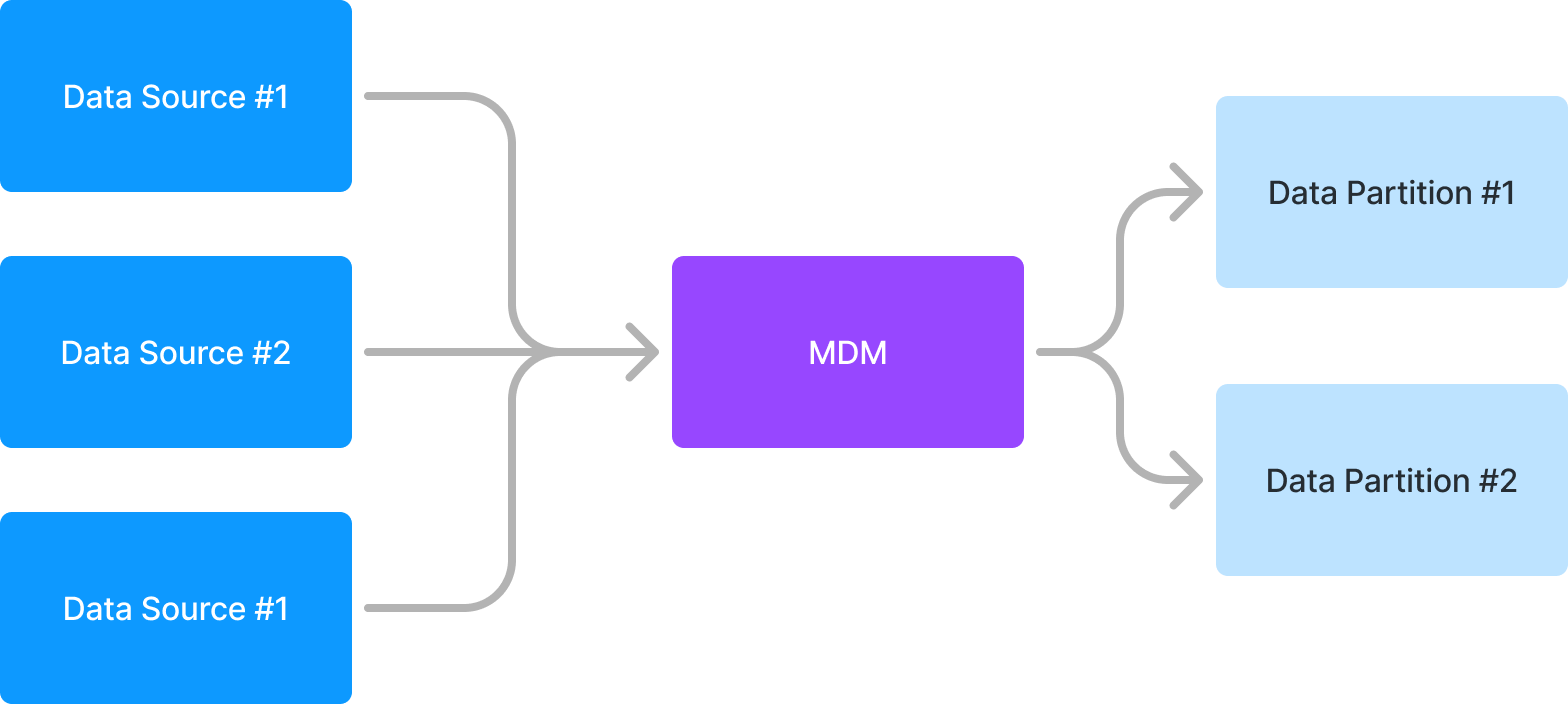
# MDM partitions
Serve unified records reconciled from multiple sources through the data partition API.
Partitions deliver a consolidated view of entities that have been resolved, reconciled, and governed by the master data management (MDM) layer. They are the primary channel for applications that need a single source of truth across multiple data sources.
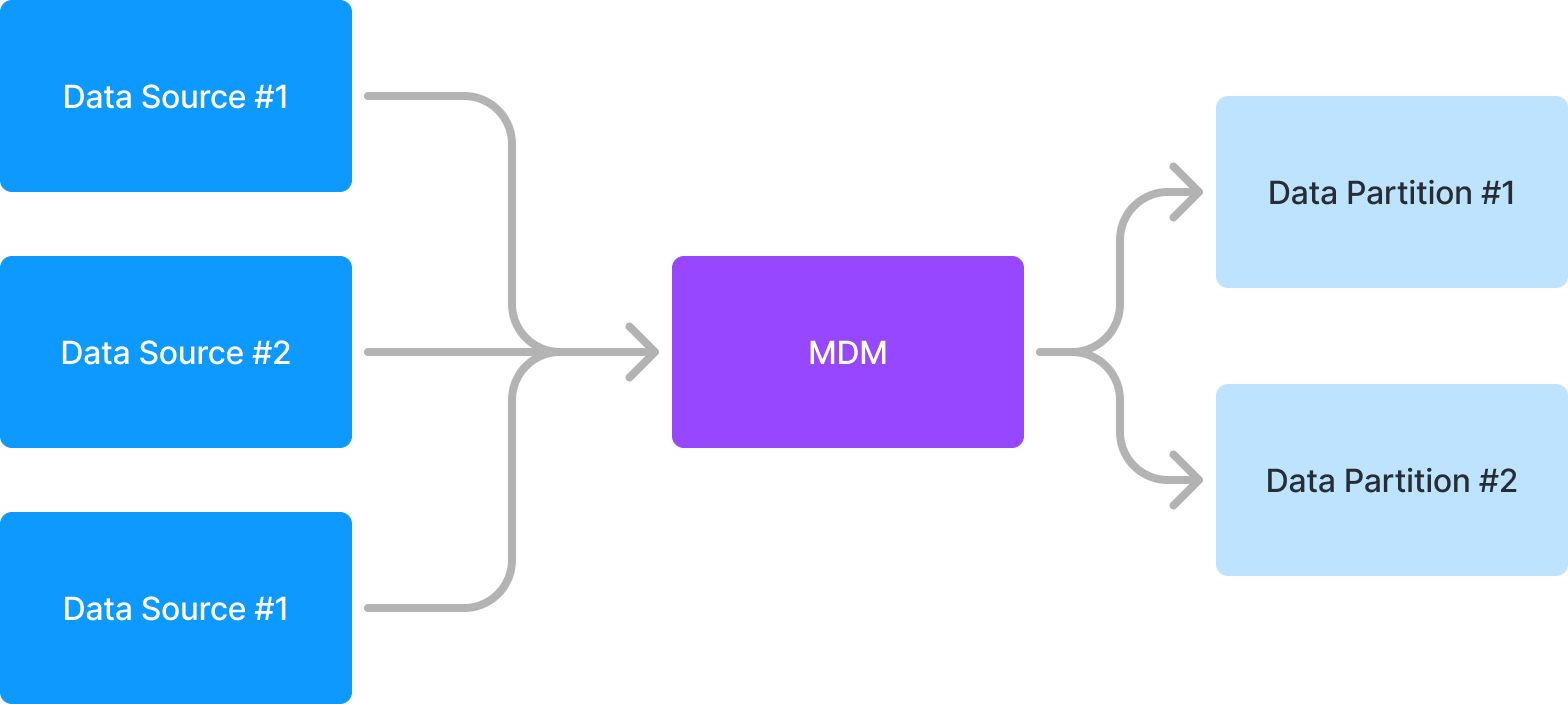
## How MDM partitions unify data
- **Entity resolution** — Records coming from multiple [data sources](/explanation/data-model/data-sources) are matched and linked into [unified records](/explanation/mdm/entity-resolution/overview). The partition surfaces this unified identifier so downstream systems never have to duplicate reconciliation logic.
- **Reconciliation rules** — Each unified resource or relationship applies [reconciliation strategies](/explanation/mdm/entity-resolution/outcome) to decide which properties win, how conflicts are resolved, and when to merge or split entities.
- **Search-ready aggregates** — After reconciliation, the partition indexes the output so applications can query, facet, and include related information through the Data Partition API.
## Configuration model
Partitions are configured through the Data Partition API:
- `source.sources` — Declares which source keys contribute records to the MDM collections exposed here.
- `collections` — Each entry references an MDM resource key and specifies how to index it. Collections include:
- `properties` defining the field schema exposed to downstream queries.
- `mappings` mapping MDM output back to source profiles to enrich unified records.
- Optional `reconciliationRules` to select a `SYSTEM` strategy or a `CLINIA_FUNCTION` that encapsulates custom merge logic.
- `relationships` — Unified relationships available for traversal. Like collections, they support `mappings`, `reconciliationRules`, and `includeKey` definitions for each side of the graph.
```json
{
"key": "provider-master",
"source": {
"sources": ["ehr-core", "claims-legacy"],
"collections": [
{
"key": "mdm-provider",
"properties": {
"name": { "type": "text" },
"specialty": { "type": "symbol" },
"npi": { "type": "symbol" }
},
"mappings": [
{
"source": "ehr-core",
"type": "provider",
"propertyMappings": {
"name": "fullName",
"specialty": "specialtyCode",
"npi": "npiNumber"
}
},
{
"source": "claims-legacy",
"type": "physician",
"propertyMappings": {
"name": "physicianName",
"specialty": "specialty",
"npi": "npi"
}
}
],
"reconciliationRules": {
"type": "SYSTEM"
}
}
],
"relationships": [
{
"relationshipType": "provider-facility",
"from": {
"profileKey": "mdm-provider",
"includeKey": "worksAt"
},
"to": {
"profileKey": "mdm-facility",
"includeKey": "employs"
},
"mappings": [
{ "source": "ehr-core", "type": "provider-facility" }
],
"reconciliationRules": {
"type": "CLINIA_FUNCTION",
"name": "facility-link",
"version": "v1.0.0"
}
}
]
}
}
```
Use this configuration when you want consumers to interact exclusively with unified resource keys and relationship graphs produced by the MDM domain.
## Collection and relationship connections
Collection and relationship connections define how unified MDM profiles or relationships appear inside a partition. They inherit the identities created by the MDM layer, describe the shape of the records that will be indexed, and map each property back to one or more contributing sources.
### Collection connections
A collection connection links a partition collection to a unified MDM collection. It covers:
- **Identity binding** — The connection chooses the unified collection whose identifiers the partition will surface.
- **Property shape** — The `properties` block defines the fields and [Clinia data types](/explanation/data-types/clinia-types) exposed to downstream queries.
- **Source mappings** — Each entry in `mappings` attaches one or more source profiles and points their fields to the unified properties that should receive the values.
`propertyMappings` use the unified property path as the key (for example `address.street`) and the source property path as the value. This keeps the transformation declarative and avoids writing ad-hoc merge code.
The snippet below shows a partition collection that surfaces the `unified-organization` profile while reconciling attributes from three different source profiles:
```json
{
"key": "unified-organization",
"properties": {
"name": {
"type": "symbol"
},
"phone": {
"type": "contactpoint"
},
"email": {
"type": "contactpoint"
},
"address": {
"type": "address"
}
},
"mappings": [
{
"source": "source-1",
"type": "clinic",
"propertyMappings": {
"name": "name",
"address": "address",
"phone": "phone"
}
},
{
"source": "source-2",
"type": "organization",
"propertyMappings": {
"name": "name",
"address": "address",
"phone": "phone",
"email": "email"
}
},
{
"source": "source-3",
"type": "doctor-office",
"propertyMappings": {
"name": "name",
"address": "address",
"email": "email"
}
}
]
}
```
### Relationship connections
Relationship connections extend the same concepts to graph edges. They ensure that unified relationship identities flow into the partition, expose the `from` and `to` sides using the unified profile keys and include paths, and map edge properties back to contributing sources.
Use relationship connections when you want downstream applications to traverse the harmonized graph instead of rebuilding joins on raw source relationships.
```json
{
"relationshipType": "provider-office",
"from": {
"profileKey": "unified-organization",
"includeKey": "staff"
},
"to": {
"profileKey": "unified-provider",
"includeKey": "worksAt"
},
"properties": {
"effective": {
"type": "period"
},
"phone": {
"type": "contactpoint"
}
},
"mappings": [
{
"source": "source-1",
"type": "provider-clinic",
"propertyMappings": {
"effective": "effectiveDate",
"phone": "phoneNumber"
}
},
{
"source": "source-2",
"type": "provider-organization",
"propertyMappings": {
"effective": "effective",
"phone": "phone"
}
},
{
"source": "source-3",
"type": "provider-office",
"propertyMappings": {
"effective": "effective",
"phone": "phone"
}
}
]
}
```
## Operational considerations
- **Latency trade-offs** — Unified data becomes available after entity resolution and reconciliation complete. Monitor processing pipelines to understand when refreshed records appear in the partition.
- **Governance** — Because MDM partitions represent system-of-record entities, manage access through IAM policies and auditing.
- **Schema stewardship** — MDM profiles evolve independently from source schemas. Coordinate updates with MDM owners to avoid breaking reconciliation logic or downstream consumers.
- **Quality feedback** — Pair partitions with workflows that push anomalies back to data stewards when reconciliation rules drop attributes or produce conflicting merges.
## Traversed Properties
In MDM partitions, traversed properties expand a partition collection beyond the recipient resource. By indexing selected attributes from adjacent relationships and resources, searches can answer cross-entity questions without duplicating data or denormalizing schemas.
Traversed properties are a search-only construct. They are indexed with the recipient resource but are not returned by `GET` calls to the underlying [partition APIs](/api-reference/data-partition/search/search-resources-of-a-specific-collection-in-the-data-partition).
### Configuring traversals
Traversed properties are declared on each collection inside an [MDM partition](/explanation/partitions/mdm-partition):
```json
{
"key": "unified-provider-directory",
"source": {
"sources": ["ehr-core", "claims-legacy"],
"collections": [
{
"key": "mdm-provider",
"mappings": [
{ "source": "ehr-core", "type": "provider" },
{ "source": "claims-legacy", "type": "physician" }
],
"traversedProperties": [
"@practices.startDate",
"@practices.@mdm-facility.address.city"
]
}
],
"relationships": [
{
"relationshipType": "provider-facility",
"from": {
"profileKey": "mdm-provider",
"includeKey": "practices"
},
"to": {
"profileKey": "mdm-facility",
"includeKey": "staff"
}
}
]
}
}
```
- `traversedProperties` lives under the collection entry in the partition configuration.
- Each entry references an include configured in the partition (`@practices` above) and drills into relationship or resource properties using dot notation.
- Only primitive and general-purpose complex [Clinia data types](/explanation/data-types/clinia-types) are supported. Nested properties within custom types can still be reached with dots.
### Traversed property notation
- `@{includeKey}.{propertyKey}` — Targets a relationship property, such as `@practices.startDate`.
- `@{includeKey}.@{resourceType}.{propertyKey}` — Targets a property on the adjacent resource, such as `@practices.@mdm-facility.address`.
- `@{includeKey}.@{resourceType}.{containedKey}.{propertyKey}` — Targets a property on a contained resource under the adjacent resource, such as `@practices.@mdm-facility.location.address`.
The same notation is used consistently when declaring the partition configuration and when issuing queries.
### Querying traversed properties
When searching a partition collection, use traversed property paths anywhere you would reference a standard property:
- **Filters** — Narrow results to resources where the traversed attribute meets certain criteria.
- **Sorting** — Order results based on relationship metadata or linked resource attributes.
- **Facets and aggregations** — Build counts or distributions over traversed values.
```bash
curl -X POST "https://$CLINIA_WORKSPACE/partitions/unified-provider-directory/v1/search" \
-H "X-Clinia-API-Key: $CLINIA_TOKEN" \
-H "Content-Type: application/json" \
-d '{
"collection": "mdm-provider",
"filters": "@practices.@mdm-facility.address.city:\"Montréal\"",
"sort": [{ "attribute": "@practices.startDate", "order": "desc" }]
}'
```
Because traversed properties update whenever the linked relationships or resources change, search results stay aligned with the latest adjacent data without needing to reingest the recipient collection separately.
### Example
Imagine a healthcare directory where providers are linked to facility profiles through a `provider-facility` relationship and exposed via the `practices` include:
- The provider collection stores clinical specialties and licensing information.
- The facility resource holds the location address and accessibility features.
- The relationship captures the employment period and role.
By traversing the facility address and the relationship’s `startDate`, a single provider search can answer “Which providers accepting new patients work in Montréal right now?” without duplicating address data on every provider record. This approach keeps unified MDM schemas focused while still enabling rich, relationship-aware search experiences.
## Related resources
- [Create a data partition API reference](/api-reference/data-catalog/partitions/create-a-data-partition) for the full request payload.
- [Browse unified collections](/api-reference/data-partition/browse/browse-accross-resource-or-relationship-collections-in-the-data-partition) to query the harmonized data.
- [Entity resolution overview](/explanation/mdm/entity-resolution/overview) to understand how unified records are generated before they reach the partition.
## Keep exploring
Revisit the concepts behind traversed properties and traversal rules.
Put traversed filters to work in analytic and discovery scenarios.
Dive into the reconciliation strategies that shape unified records.
Understand how aggregated record previews guide stewarding decisions.
# Data sources
Define the upstream systems that own records, schemas, and synchronization rules.
Data sources are the authoritative entry points for everything you ingest into the Clinia registry. Each source captures where a record originates, which profiles it must respect, and how your upstream system pushes changes into Clinia.
## What a data source governs
- **Provenance** — Every record, relationship, and object references its originating source so you can audit lineage and route updates back to the right system of record.
- **Synchronization flow** — The source declares how data arrives (currently API push) and which environments or jobs publish into it.
- **Processing boundary** — Validation, ingestion pipelines, and access controls execute independently per source, allowing teams to tune quality gates without affecting other domains.
The Clinia platform currently only supports API-driven synchronization.
## Configuration essentials
A data source definition consists of a unique key, metadata, and the profiles it owns. Keep keys stable because they appear in API paths, identifiers, and audit logs.
```json
{
"key": "ehr-prod",
"type": "registry",
}
```
- `key` — URL-safe identifier referenced across registry APIs and partitions. Must follow this pattern: `^[a-zA-Z0-9-][\w-]{0,61}$`
- `type` — Categorizes how data is managed. Use `registry` for resources written directly to the Clinia registry.
The Clinia platform only supports `registry` sources at this time.
## Operating data sources
- **One source per schema** — When upstream systems expose different schemas or lifecycle rules, create dedicated sources. This keeps validation strict and provenance clear.
- **Coordinate schema changes** — Version profiles before pushing breaking changes so ingestion never fails unexpectedly.
- **Secure access** — Tie API keys and IAM roles to specific sources to prevent accidental cross-domain writes.
- **Monitor freshness** — Track ingestion timestamps to surface sources that stopped publishing data.
## Related references
- [List the data sources API](/api-reference/data-catalog/sources/list-the-data-sources) for the canonical schema and endpoints.
- [Data ingestion overview](/explanation/ingestion-pipeline/basics) to understand how sources feed the registry.
## Keep exploring
Learn how schemas define which properties each source can store.
See how sources describe graph connections between their profiles.
Connect source configuration to the broader Clinia data model.
# Profiles
Model resource schemas, validation, and contained components for each data source.
Profiles are the contracts that govern every resource stored under a data source. They define which properties exist, how values are validated, and which contained structures travel with each record. Each ingested resource must reference a profile key, making profiles essential for data quality and interoperability.
If the data should be queryable on its own, model it as a separate collection linked via relationships. Use contained components for embedded structures that only exist within a parent record and are never queried independently.
## Anatomy of a profile
A profile describes its type, properties, optional contained components, and any validation rules. The example below highlights common patterns.
```json
{
"description": "Healthcare provider practicing within the network",
"properties": {
"name": {
"type": "humanname",
"rules": [{ "required": true }]
},
"specialties": {
"type": "array",
"items": {
"type": "code",
"binding": {
"vocabulary": {
"key": "medical-specialty",
"strength": "preferred"
}
}
}
},
"acceptingNewPatients": {
"type": "boolean"
}
},
"contained": {
"openingHours": {
"cardinality": "0:1",
"properties": {
"monday": {
"type": "object",
"properties": {
"open": {
"type": "time",
"rules": [
{
"required": true
}
]
},
"close": {
"type": "time",
"rules": [
{
"required": true
}
]
}
}
}
}
}
}
}
```
- `properties` — List each attribute and its [data type](/explanation/data-types/base-types). Use validation `rules` to enforce required fields, ranges, enums, or vocabulary bindings.
- `contained` — Declare embedded components with their properties and cardinality.
- `description` — Document the business meaning so stewards understand how the schema should evolve.
## Designing robust profiles
- **Validate early** — Use rules and vocabularies to fail fast when data violates expectations. This keeps ingestion clean and downstream reconciliation easier.
- **Plan for evolution** — Introduce new optional properties before deprecating old ones. Coordinate schema updates with upstream producers to prevent ingestion failures.
- **Document relationships** — Capture how profiles connect using [relationship definitions](/explanation/sources/relationship) so downstream consumers understand the graph.
## Related references
- [List all collections API](/api-reference/registry/collections/list-all-collections-in-a-source) for canonical request and response structures.
- [Clinia data types](/explanation/data-types/clinia-types) for complex types such as `address`, `contactpoint`, and `humanname`.
- [Field validation basics](/explanation/field-validation/basic) to craft rules that enforce data quality at ingestion time.
## Keep exploring
Understand how profiles attach to the systems that publish data.
Learn how profiles connect to form the registry graph.
See how unified views consume profile-defined schemas downstream.
# Relationship definitions
Model how profiles connect, including include keys, cardinalities, and relationship properties.
Relationship definitions capture the graph structure between resources managed by a data source. They describe which profiles can be connected, what each side of the relationship is called, and which properties travel with the connection itself.
## Core concepts
- **Include keys** — Human-readable aliases that expose relationships in APIs and partitions (for example `worksAt`, `staff`). They appear in `includes`, traversed properties, and search filters.
- **Cardinality** — Expresses how many instances can exist from each side (`0:1`, `0:*`, `1:1`, etc.). Cardinality guides data quality rules during ingestion.
- **Relationship properties** — Optional attributes stored alongside the link, such as effective periods or metadata about the connection.
Relationship definitions are scoped to a data source. When the same profiles exist in multiple sources, declare the relationship separately in each to keep provenance clean.
## Structure of a relationship definition
```json
{
"key": "provider-facility",
"from": {
"profileKey": "provider",
"includeKey": "worksAt",
"cardinality": "0:*"
},
"to": {
"profileKey": "facility",
"includeKey": "staff",
"cardinality": "0:*"
},
"properties": {
"effective": {
"type": "period"
},
"roles": {
"type": "array",
"items": {
"type": "code"
}
}
}
}
```
- `from` / `to` — Anchor each side to a profile, set the include key name, and declare cardinality.
- `properties` — Optional structure that uses the same [data types](/explanation/data-types/base-types) available to profiles.
## Designing effective relationships
- **Name includes for consumers** — Choose verbs or nouns that make sense in queries (`worksAt`, `offeredServices`) so search configurations are intuitive.
- **Validate business rules** — Cardinalities should mirror real-world constraints. Use ingestion tests to verify they reject invalid scenarios early.
- **Prepare for partitions** — Clearly defined include keys make it straightforward to configure [traversed properties](/explanation/partitions/mdm-partition#traversed-property-notation) and expose adjacent attributes in search.
## Keep exploring
Understand how relationships inherit provenance from their parent source.
Revisit the schemas that relationships connect.
Learn how relationship includes become searchable attributes.
# Browse
Iterate through large datasets in selected partitions using a cursor-based snapshot for consistent bulk extraction with filtering and property selection.
The **Browse API** provides a way to iterate through large datasets in selected partitions across resource, relationship, or object collections, while ensuring data integrity across requests. Unlike search-based queries, browsing is designed for systematic extraction of records, often in bulk, while applying filters and property selectors as needed.
## Endpoint
Access the complete API reference documentation for the Regisrty Browse endpoint, including all parameters, request/response schemas, and examples.
Access the complete API reference documentation for the Partition Browse endpoint, including all parameters, request/response schemas, and examples.
### Parameters
#### Page Size
Each Browse API request can return a configurable number of records. By default, the API returns 100 records per call. However, you can change this limit if you require larger or smaller batches (1000 maximum). Unlike a traditional pagination system, there is no page parameter. Instead, pagination is controlled entirely by the cursor.
```json title="JSON Request"
{
"perPage": 1000
}
```
#### Target Collection
Browsing targets a specific collection, such as Provider resources or Provider-Office relationships. Only one collection can be targeted per browsing session, which helps maintain consistency in filtering and property selection.
```json title="JSON Request"
{
// ..
"collectionKeys": ["provider", "office", "provider-office"]
}
```
#### Filters
You can refine the results by applying filters within the collection you are browsing. The API supports both logical operators (such as `and`, `or`) and equation operators (such as `eq`, `lt`, `gt`, `any`, `all`).
It’s important to note that filters only affect the current collection. For example, if you browse Collection X, your filters cannot restrict results based on linked Collection Y data.
As soon as filters are applied, only collection resources or relationships matching those filters will be returned.
```json title="JSON Request"
{
// ..
"params": {
"filter": {
"eq": {
"resources..": "123"
}
}
}
}
```
#### Property Selector
To optimize payload size, you can specify which properties should be returned for each record (Via Includes and Excludes). A property selector allows you to explicitly choose the fields you need, whether they are top-level record properties or nested resource properties.
This also works on contained properties, but not on clinia-managed meta & identifiers.
Includes: Once applied, only the selected properties are included in the response, while all others are excluded.
Excludes: Once applied, the selected properties are excluded from the response
```json title="JSON Request"
{
// ..
"params": {
// ...
"properties": {
"include": [
"relationships..",
"resources.."
],
"exclude": [
"relationships..",
"resources.."
]
}
}
}
```
#### Cursor (Snapshot ID)
When you start a browsing session with the first API call, the system returns a cursor, also referred to as a snapshot ID. This cursor serves as your position marker in the dataset:
* It is fixed for the entire session.
* You must pass it back with each subsequent call so the API knows where to resume. If not provided, the session will restart from the beginning
* The system tracks your progress internally and ensures you get the next batch of records without overlap.
* When the dataset has been fully consumed, the API response will no longer include a cursor.
* No other parameters under "params" must be provided when a cursor is active.
This design ensures consistency across calls, even if the underlying data changes while you are browsing.
```json title="JSON Response"
{
"hits": [
// ...
],
"meta": {
"cursor": "FGluY2x1ZGVfY29udGV4dF...teHZNM1ZXQQ==",
"total": 1234
}
}
```
Include the cursor from the initial response in each subsequent request to continue from where you left off.
```json title="JSON Request"
{
// ..
"params": {
"cursor": "FGluY2x1ZGVfY29udGV4dF...teHZNM1ZXQQ=="
}
}
```
***
## Best Practices
The Browse API is designed for systematic data extraction rather than real-time query scenarios. To maximize efficiency and maintain data integrity, consider the following guidelines:
### Use Cases
* Bulk Data Retrieval: Extracting large sets of records for offline processing, synchronization, or reporting.
* Data Warehousing & ETL: Feeding records into downstream pipelines while ensuring integrity across batches.
* System Integrity: Use when the exact dataset snapshot consistency matters more than freshness between calls.
### Not Recommended For
* Real-Time Search: Use the appropriate [Search API](/api-reference/data-partition/search/search-resources-of-a-specific-collection-in-the-data-partition) (resources or relationships) for user-facing discovery.
* Sorting Needs: Browse results are system-defined and not ordered by collection or metadata.
* Cross-Collection Filtering: Filters apply only within a given collection, not across collections or to relationships.
### Pagination & Cursor Management
* Always **store and reuse the cursor** returned by the first call.
* A cursor remains valid for 5 minutes after the last use. Ensure timely follow-up calls to avoid session expiration.
* If a cursor expires, start a new browsing session from the beginning.
### Batching Strategy
* Use the **maximum page size (1,000)** only when necessary; smaller sizes reduce memory footprint and make error handling easier.
* For resilience, implement **retry logic** in case of network issues.
* If your workflow depends on completing the full dataset extraction, **persist cursors** between calls.
# Historical Import
Preserve original timestamps and identifiers when migrating historical data into Clinia.
Each hit returned by Clinia is enriched with metadata information such as `createdAt` and `updatedAt`, which are generated automatically by Clinia's infrastructure.
To allow for more flexibility and support a system migration, Clinia's [Resource API](/api-reference/registry/resources/upsert-a-resource-in-the-registry), [Relationship API](/api-reference/registry/relationships/create-a-relationship-between-two-resources-in-the-registry), [Bulk API](/api-reference/registry/bulk/bulk-create-upsert-or-delete-resources) and [Bundle API](/api-reference/registry/bundle/bundle-resource-and-relationship-operations-to-be-processed) allow specifying metadata information in a create or upsert operation (but not update).
System modifiable metadata properties are:
```json
{
"createdAt": "",
"updatedAt": "",
"identifier": [
{
// Identifier type
}
]
}
```
## Metadata Rules
Some validation rules are imposed on those metadata to ensure consistency with system-generated values. Those are:
* If a value is specified for `updatedAt`, one must also be provided for `createdAt`
* The datetime value of the `updatedAt` must be greater or equal to the `createdAt`
* The `createdAt` and `updatedAt` datetime values cannot be in the future.
* The `identifier` field must contain [Identifier Type](/explanation/data-types/clinia-types#identifier-identifier) with distinct combined values of `system`, `use` and `value` fields.
* Field `use` can't take the reserved value `"source"`
* Field `system` can't take the reserved value `"mdm"`
## Examples
This setup creates a demo registry source with minimal profiles and a relationship so the examples can run consistently.
```bash {collectForTests="histSource"}
curl -X PUT "https://$CLINIA_WORKSPACE/catalog/v1/sources/history-demo" \
-H "X-Clinia-API-Key: $CLINIA_TOKEN" \
-H "Content-Type: application/json" \
-d '{
"type": "registry"
}'
```
```bash {collectForTests="histProfilesPatient"}
curl -X PUT "https://$CLINIA_WORKSPACE/sources/history-demo/v1/collections/patient" \
-H "X-Clinia-API-Key: $CLINIA_TOKEN" \
-H "Content-Type: application/json" \
-d '{
"type": "resources",
"profile": {
"properties": {
"name": {
"type": "array",
"items": {
"type": "humanname"
}
},
"birthDate": {
"type": "date"
}
}
}
}'
```
```bash {collectForTests="histProfilesPractitioner"}
curl -X PUT "https://$CLINIA_WORKSPACE/sources/history-demo/v1/collections/practitioner" \
-H "X-Clinia-API-Key: $CLINIA_TOKEN" \
-H "Content-Type: application/json" \
-d '{
"type": "resources",
"profile": {
"properties": {
"name": {
"type": "array",
"items": {
"type": "humanname"
}
}
}
}
}'
```
```bash {collectForTests="histRelDef"}
curl -X PUT "https://$CLINIA_WORKSPACE/sources/history-demo/v1/collections/treats" \
-H "X-Clinia-API-Key: $CLINIA_TOKEN" \
-H "Content-Type: application/json" \
-d '{
"type": "relationships",
"relationshipDefinition": {
"description": "A relationship indicating that a practitioner treats a patient",
"from": {
"profileKey": "practitioner",
"includeKey": "practitioner",
"includeCardinality": "0:*"
},
"to": {
"profileKey": "patient",
"includeKey": "patient",
"includeCardinality": "0:*"
},
"properties": {}
}
}'
```
### Resource Upsert
Specify system-modifiable metadata when creating or replacing a resource. See the [Resource API Reference](/api-reference/registry/resources/upsert-a-resource-in-the-registry).
```bash {collectForTests="histUpsert"}
curl -X PUT "https://$CLINIA_WORKSPACE/sources/history-demo/v1/resources/patient/patient-001" \
-H "X-Clinia-API-Key: $CLINIA_TOKEN" \
-H "Content-Type: application/json" \
-d '{
"data": {
"name": [
{
"given": [
"John"
],
"family": "Doe"
}
],
"birthDate": "1980-01-01"
},
"meta": {
"createdAt": "2020-05-01T10:00:00Z",
"updatedAt": "2021-06-15T12:30:00Z",
"identifier": [
{
"system": "https://hospital.example/mrn",
"value": "12345",
"use": "external"
}
]
}
}'
```
Before fetching the resource, make sure the [ingestion task is completed](/guides/managing-data/tasks#checking-task-status).
```bash {collectForTests="histUpsertGet"}
curl -X GET "https://$CLINIA_WORKSPACE/sources/history-demo/v1/resources/patient/patient-001" \
-H "X-Clinia-API-Key: $CLINIA_TOKEN"
```
```json {collectForTests="histUpsertObj"}
{
"id": "patient-001",
"type": "patient",
"includes": {},
"meta": {
"createdAt": "2020-05-01T10:00:00Z",
"updatedAt": "2021-06-15T12:30:00Z",
"identifier": [
{
"system": "https://hospital.example/mrn",
"value": "12345",
"use": "external"
}
],
"source": "history-demo"
},
"data": {
"name": [{ "given": ["John"], "family": "Doe" }],
"birthDate": "1980-01-01"
}
}
```
### Relationship Create
Create a relationship with historical metadata on the link itself. See the [Relationship API Reference](/api-reference/registry/relationships/create-a-relationship-between-two-resources-in-the-registry).
First, ensure the related resources exist (no global seeding required):
```bash {collectForTests="histRelPrePatient"}
curl -X PUT "https://$CLINIA_WORKSPACE/sources/history-demo/v1/resources/patient/patient-001" \
-H "X-Clinia-API-Key: $CLINIA_TOKEN" \
-H "Content-Type: application/json" \
-d '{
"data": {
"name": [
{
"given": [
"John"
],
"family": "Doe"
}
],
"birthDate": "1980-01-01"
}
}'
```
```bash {collectForTests="histRelPrePract"}
curl -X PUT "https://$CLINIA_WORKSPACE/sources/history-demo/v1/resources/practitioner/pract-001" \
-H "X-Clinia-API-Key: $CLINIA_TOKEN" \
-H "Content-Type: application/json" \
-d '{
"data": {
"name": [
{
"given": [
"Alice"
],
"family": "Anderson"
}
]
}
}'
```
```bash {collectForTests="histRelCreate"}
curl -X POST "https://$CLINIA_WORKSPACE/sources/history-demo/v1/relationships/treats" \
-H "X-Clinia-API-Key: $CLINIA_TOKEN" \
-H "Content-Type: application/json" \
-d '{
"from": {
"type": "practitioner",
"id": "pract-001"
},
"to": {
"type": "patient",
"id": "patient-001"
},
"meta": {
"createdAt": "2021-07-01T09:00:00Z",
"updatedAt": "2021-07-01T09:00:00Z",
"identifier": [
{
"system": "https://ehr.example/relationship-id",
"value": "rel-7890",
"use": "external"
}
]
},
"data": {}
}'
```
Before fetching the relationship, make sure the [ingestion task is completed](/guides/managing-data/tasks#checking-task-status).
```bash {collectForTests="histRelGet"}
curl -X GET "https://$CLINIA_WORKSPACE/sources/history-demo/v1/relationships/treats/pract-001.patient-001" \
-H "X-Clinia-API-Key: $CLINIA_TOKEN"
```
```json {collectForTests="histRelObj"}
{
"id": "pract-001.patient-001",
"type": "treats",
"from": { "type": "practitioner", "id": "pract-001" },
"to": { "type": "patient", "id": "patient-001" },
"data": {},
"meta": {
"createdAt": "2021-07-01T09:00:00Z",
"updatedAt": "2021-07-01T09:00:00Z",
"identifier": [
{
"system": "https://ehr.example/relationship-id",
"value": "rel-7890",
"use": "external"
}
],
"source": "history-demo"
}
}
```
### Bulk Request
Process multiple resource creations with historical metadata using the [bulk resources endpoint](/api-reference/registry/bulk/bulk-create-upsert-or-delete-resources), then poll the task result. Also see the [Task API Reference](/api-reference/registry/task/get-a-task-from-the-registry).
```bash {collectForTests="histBulk"}
curl -X POST "https://$CLINIA_WORKSPACE/sources/history-demo/v1/resources/bulk" \
-H "X-Clinia-API-Key: $CLINIA_TOKEN" \
-H "Content-Type: application/json" \
-d '{
"operations": [
{
"action": "CREATE",
"create": {
"type": "patient",
"id": "patient-002",
"data": {
"name": [
{
"given": [
"Carla"
],
"family": "Nguyen"
}
],
"birthDate": "1990-02-02"
},
"meta": {
"createdAt": "2019-03-10T08:00:00Z",
"updatedAt": "2019-03-10T08:00:00Z",
"identifier": [
{
"system": "https://hospital.example/mrn",
"value": "67890",
"use": "external"
}
]
}
}
}
]
}'
```
Before fetching the resource, make sure the [ingestion task is completed](/guides/managing-data/tasks#checking-task-status).
```bash {collectForTests="histBulkGet"}
curl -X GET "https://$CLINIA_WORKSPACE/sources/history-demo/v1/resources/patient/patient-002" \
-H "X-Clinia-API-Key: $CLINIA_TOKEN"
```
```json {collectForTests="histBulkObj"}
{
"id": "patient-002",
"type": "patient",
"includes": {},
"meta": {
"createdAt": "2019-03-10T08:00:00Z",
"updatedAt": "2019-03-10T08:00:00Z",
"identifier": [
{
"system": "https://hospital.example/mrn",
"value": "67890",
"use": "external"
}
],
"source": "history-demo"
},
"data": {
"name": [{ "given": ["Carla"], "family": "Nguyen" }],
"birthDate": "1990-02-02"
}
}
```
# Purge
Bulk delete all resources or relationships of a specific type from a data source using the Purge API endpoint
The Purge API endpoint facilitates the bulk deletion of resources or relationships from a data source. This operation is ideal for cleanup tasks, ensuring that all data of a specific collection is completely removed from the target source.
# Using the Purge Endpoint
A purge request specifies exactly what Data Source is the target of the operation, including the type and key of the contained collection to remove all data.
```json
{
"collectionType": "", // "resources" or "relationships" based on what is targeted
"collectionKey": ""
}
```
To delete all "providers" contained in a collection, the payload would look like:
```json
{
"collectionType": "resources",
"collectionKey": "provider"
}
```
_For more details, see [Create Purge Operation](/api-reference/registry/purge/purge-operation-request-for-resources-or-relationships)._
## Purge Status
Once a purge operation is initiated, the system responds with a unique identifier (`purgeId`) and details about the operation’s progress:
```json
{
"purgeId": "", // Id of the purge operation.
"collectionType": "", // "resources" or "relationships" based on what is targeted
"collectionKey": "",
"status": "", // Status of the purge operation ("SUCCESS", "PENDING" or "FAILURE")
"deletedCount": 0, // Number of items affected by the purge operation
"createdAt": "2023-12-12T15:30:10.0000Z",
"updatedAt": "2023-12-12T15:31:10.0000Z"
}
```
You can use the purgeId to retrieve the status of an ongoing operation, similar to bulk operation monitoring.
When the status is "SUCCESS", the specified elements have been deleted from the registry, additionally, the system ensures eventual consistency at the partition level. This means that while the data has been purged from the data sources, there may be a delay before the changes propagate across all partitions referring to it.
_For more details, refer to [Using the Purge Status](/api-reference/registry/purge/get-the-result-of-a-purge-request)_
## Notes
* **Target the Correct Data Source:**
Ensure the `collectionKey` accurately identifies the intended collection within the data source to avoid unintentional deletions.
* **Use `collectionType` to Differentiate Targets:**
* `resources`: Targets resources like `provider` or `office`.
* `relationships`: Targets relationships such as `provider-office`.
* **Best Practices for Safe Purging:**
* Review all inputs before initiating a purge.
* Use status monitoring (purgeId) to confirm successful execution or handle errors.
**Deletion Propagation**
The purge operation uses a cascading effect. If a resource is deleted, all its attached relationships will also be deleted.
This is not the case for relationships. Deleting relationships will not affect their referred resources.
# Tasks
Process large volumes of registry operations efficiently using the bulk API or ensure atomicity with bundle requests
Tasks are a grouping of operations that can be processed together in the registry. There are three common
ways tasks are created:
- **Bulk tasks**: Process large volumes of resource or relationship operations asynchronously.
- **Bundle tasks**: Apply resources and relationships atomically in a single transaction.
Bulk tasks are intended to be used for high-throughput operations where you need to create, update, or delete many resources or relationships efficiently.
Bundle tasks are useful when you need to ensure that a set of operations either all succeed or all fail together, maintaining data integrity.
## Overview
The task API workflow consists of two main steps:
1. **Submit a task request** - Send a batch of operations using the bulk endpoints. This returns a task ID.
2. **Check task status** - Monitor the progress and retrieve results using the task ID.
There is no way to retrieve the task ID after submitting a bulk request. Make sure to store it for later use!
### At a glance
| | **[Bundle API](/api-reference/registry/bundle/bundle-resource-and-relationship-operations-to-be-processed)** | **Bulk API** ([Resources](/api-reference/registry/bulk/bulk-create-upsert-or-delete-resources), [Relationships](/api-reference/registry/bulk/bulk-create-upsert-or-delete-relationships)) |
| ------------------------------ | -------------------------------------------------- | ------------------------------------------------------ |
| **Use Case** | Multiple operations on [Resources](/explanation/data-model/data-sources#resources) and [Relationships](/explanation/data-model/data-sources#relationships) | Optimizing operations when dealing with large volumes. |
| **Execution** | Synchronous | Asynchronous |
| **Supported Operations** | `"CREATE"`,`"UPSERT"`, `"DELETE"` | `"CREATE"`,`"UPSERT"`, `"DELETE"` |
| **Atomic Transaction** | Yes | No |
| **Maximum Volume per Request** | 500 KB | 5 GB |
## Supported bulk operations
The registry supports bulk operations for both resources and relationships:
- **Resource operations**: `CREATE`, `UPSERT`, or `DELETE` multiple resources
- **Relationship operations**: `CREATE`, `UPSERT`, or `DELETE` multiple relationships
Both are very similar in structure, but the endpoints and payloads differ.
## Creating a bulk request
### Bulk resources
Use the [bulk resources endpoint](/api-reference/registry/bulk/bulk-create-upsert-or-delete-resources) to process multiple resource operations:
```bash {collectForTests=bulkResourcesRequest}
curl -X POST "https://$CLINIA_WORKSPACE/sources/my-source/v1/resources/bulk" \
-H "X-Clinia-API-Key: $CLINIA_TOKEN" \
-H "Content-Type: application/json" \
-d '{
"operations": [
{
"action": "CREATE",
"create": {
"type": "patient",
"id": "patient-123",
"data": {
"name": [
{
"given": [
"John"
],
"family": "Doe"
}
]
}
}
}
]
}'
```
```json {collectForTests=bulkResourcesResponse}
{
"status": "ACCEPTED",
"taskId": "bk_30yCPmXLjSOokoLC0B9z5Gs1QCa"
}
```
### Bulk relationships
Use the [bulk relationships endpoint](/api-reference/registry/bulk/bulk-create-upsert-or-delete-relationships) to process multiple relationship operations:
```bash {collectForTests=bulkRelationshipsRequest}
curl -X POST "https://$CLINIA_WORKSPACE/sources/my-source/v1/relationships/bulk" \\
-H "X-Clinia-API-Key: $CLINIA_TOKEN" \\
-H "Content-Type: application/json" \\
-d '{
"operations": [
{
"action": "CREATE",
"create": {
"type": "treats",
"from": {
"type": "practitioner",
"id": "doctor-123"
},
"to": {
"type": "patient",
"id": "patient-123"
},
"data": {}
}
}
]
}'
```
```json {collectForTests=bulkRelationshipsResponse}
{
"status": "ACCEPTED",
"taskId": "bk_30yCPmXLjSOokoLC0B9z5Gs1QCa"
}
```
## Bundle operations
Use the [bundle endpoint](/api-reference/registry/bundle/bundle-resource-and-relationship-operations-to-be-processed) to process resources and relationships atomically.
If any operation in the bundle fails, none of the operations are applied.
```bash {collectForTests=bundleRequest}
curl -X POST "https://$CLINIA_WORKSPACE/sources/my-source/v1/bundle" \
-H "X-Clinia-API-Key: $CLINIA_TOKEN" \
-H "Content-Type: application/json" \
-d '{
"resourceOperations": [
{
"action": "CREATE",
"create": {
"type": "patient",
"id": "patient-123",
"data": {
"name": [
{
"given": [
"John"
],
"family": "Doe"
}
]
}
}
}
],
"relationshipOperations": []
}'
```
## Response format
A successful bulk or bundle operation returns an `ACCEPTED` [status](/api-reference/registry/bulk/bulk-create-upsert-or-delete-resources#response-body), meaning the task is processed asynchronously in the background.
```json {collectForTests=bundleResponse }
{
"status": "ACCEPTED",
"taskId": "bd_30sSi7otihHAiRpJ8F1YLpw6kfn"
}
```
## Checking task status
Whether you submitted a bulk request or a bundle operation, you can check the status of the task and
eventually retrieve the results using the [task endpoint](/api-reference/registry/task/get-a-task-from-the-registry).
```bash
curl -X GET "https://$CLINIA_WORKSPACE/sources/my-source/v1/tasks/{taskId}?withReceipts=true" \
-H "X-Clinia-API-Key: $CLINIA_TOKEN"
```
```json
{
"id": "bulk_abc123",
"status": "SUCCESS",
"createdAt": "2024-01-15T10:00:00Z",
"completedAt": "2024-01-15T10:05:30Z",
"operationReceipts": [
{
"status": "SUCCESS",
"action": "CREATE",
"target": {
"targetType": "RESOURCE",
"type": "patient",
"id": "patient-123"
},
"receivedAt": "2024-01-15T10:00:01Z",
"processedAt": "2024-01-15T10:01:15Z"
}
]
}
```
### Task statuses
The overall status of the task represents the completion state of all operations in the bulk request. The [possible values](/api-reference/registry/task/get-a-task-from-the-registry#response-body) are:
- `SUCCESS` - All the operations of the task completed successfully
- `PENDING` - At least one operation in the task is still pending
- `CANCELLED` - All the operations in the task were cancelled
- `FAILURE` - At least one operations failed or was cancelled
The `CANCELLED` status can only occur if the operation was cancelled by the system. There is currently
no way to cancel a task or an operation manually.
For instance, if two tasks are submitted to operate on the same record id, the later task will be
kept and the earlier one will be cancelled.
# Hybrid Search
Combine lexical and semantic retrieval for high recall and precision.
Hybrid search blends multiple retrieval methods in a single query—typically lexical (keyword) and semantic (vector/embedding) search—to return results that are both precise and comprehensive. Instead of choosing one approach, you combine signals so users get exact matches for explicit terms plus conceptually related content for intent. This page focuses specifically on the `match` parameter of the `query` object. For a higher‑level overview of how search works in Clinia, see [Search Parameters](/explanation/search).
Hybrid search is most effective when your data contains both well‑structured fields (names, codes, IDs) and unstructured text (notes, descriptions), or when queries mix exact terms and fuzzy natural language.
## Why use hybrid search
- Broader recall for natural language. Vectors capture synonyms and intent (“heart attack” ≈ “myocardial infarction”).
- Higher precision for critical terms. Lexical matching anchors on exact fields (identifiers, codes, brands, dosages).
- Resilience to query drift. If a user’s terms don’t exist verbatim, semantic matching still retrieves plausible candidates, while keyword matching prevents off‑topic drift.
- Better ranking quality. Fusing multiple relevance signals typically outperforms either signal alone on heterogeneous data.
## When to use it
- Consumer or clinical search where language varies (“stomach bug” vs ICD/LOINC terms).
- Knowledge, directory, and chart search where documents blend metadata and narrative.
- Safety‑critical workflows where you must honor exact constraints (coverage, specialty, location) yet still support natural‑language discovery.
If your corpus is small, highly structured, and queries are consistent, pure lexical search may suffice. If queries are open‑ended with few exact identifiers, semantic‑only may be competitive. Most real‑world health data benefits from hybrid.
## Choosing `or` vs `and` in your query logic
Hybrid queries commonly wrap sub‑queries in boolean operators. Choosing `or` vs `and` controls recall vs precision:
Use `or` to broaden recall. Return results that match either lexical or semantic criteria. Best for exploration or conversational search use cases, where missing a relevant item is more costly than including a few loosely related results that the caller won't account for anyway.
Use `and` to enforce precision. Require that results satisfy both lexical and semantic conditions (for example, match a specialty code `and` be semantically similar to the narrative).
### Guidelines
- Start with `or` at the query stage for discovery, combine with strict filter constraints (coverage, geography) to keep results focused.
- Use `and` when you must guarantee a hard match (e.g., an identifier, specialty, or vocabulary binding) and want semantic relevance inside that slice.
- Prefer `and` for short, ambiguous queries that otherwise yield too many broad semantic matches; prefer `or` for longer, specific queries where either signal could be sufficient.
### How `knn` interacts with boolean logic
Roughly speaking, `knn` returns a fixed‑size nearest‑neighbor candidate set (top‑K) from the chosen vector field, ordered by semantic similarity to the query vector.
When you combine `knn` with `and`, you are filtering that candidate bucket: only items in the `knn` set that also satisfy the other clauses remain eligible, and their semantic similarity continues to influence ranking alongside any lexical scores.
With `or`, you take the union of candidates from all clauses and blend ranking signals, so results that satisfy both semantic and lexical conditions typically rank higher than those matching only one.
Top‑level `filter` constraints gate eligibility; they do not add positive score.
## Where hybrid search fits in Clinia
- Use lexical operators (e.g., [`match`](/explanation/operator#match-match)) over structured fields to anchor precision.
- Use semantic operators (e.g., [`knn`](/explanation/operator#knn-knn)) to capture intent and synonyms.
- Use hybrid search to improve recall when there is a lexical gap.
## Examples
The examples below show explicit `query` objects with operators and values written out manually. In a real app, when users type natural language, you may be better served by a `semanticQuery`. When specifying operators manually, you need to already know "what" you are looking for. The `knn` operator will work best with good `match` operators and `filter` constraints that you already know.
### Provider directory — discovery (OR)
Mix consumer phrasing with structured constraints; maximize recall.
Patients rarely use taxonomy codes. They type “heart doctor near me that takes Blue Cross.” Hybrid search lets you keep hard eligibility filters (plan, distance, status) while still understanding lay language via semantic similarity, reducing zero‑result queries and time‑to‑find.
Using `or` here allows us to increase recall by allowing semantic matches on the `bio` property even
if the specialty term is not explicitly mentioned.
In practice, providers that match both clauses (`specialty` + `bio`) will rank higher, but we allow
more candidates to be considered. This is very useful if there might be very few exact matches for the
speciality term alone.
This example uses a minimal provider directory dataset with vectorized bios.
```bash {collectForTests="provSource"}
curl -X PUT "https://$CLINIA_WORKSPACE/catalog/v1/sources/provider-demo" \
-H "X-Clinia-API-Key: $CLINIA_TOKEN" \
-H "Content-Type: application/json" \
-d '{
"type": "registry"
}'
```
```bash {collectForTests="provProfile"}
curl -X PUT "https://$CLINIA_WORKSPACE/sources/provider-demo/v1/collections/providers" \
-H "X-Clinia-API-Key: $CLINIA_TOKEN" \
-H "Content-Type: application/json" \
-d '{
"type": "resources",
"profile": {
"properties": {
"name": {
"type": "symbol"
},
"specialty": {
"type": "object",
"properties": {
"code": {
"type": "symbol"
},
"text": {
"type": "symbol"
}
}
},
"bio": {
"type": "object",
"properties": {
"text": {
"type": "symbol"
}
}
},
"insurances": {
"type": "array",
"items": {
"type": "symbol"
}
},
"location": {
"type": "geopoint"
},
"status": {
"type": "symbol"
}
}
}
}'
```
```bash {collectForTests="provPipeline"}
curl -X PUT "https://$CLINIA_WORKSPACE/sources/provider-demo/v1/collections/providers/pipeline" \
-H "X-Clinia-API-Key: $CLINIA_TOKEN" \
-H "Content-Type: application/json" \
-d '{
"steps": [
{
"type": "VECTORIZER",
"vectorizer": {
"inputProperty": "bio.text",
"modelId": "text-embedding-004",
"propertyKey": "vector",
"provider": "google",
"dimensions": 768
}
}
]
}'
```
```bash {collectForTests="provData"}
curl -X POST "https://$CLINIA_WORKSPACE/sources/provider-demo/v1/resources/bulk" \
-H "X-Clinia-API-Key: $CLINIA_TOKEN" \
-H "Content-Type: application/json" \
-d '{
"operations": [
{
"action": "CREATE",
"create": {
"type": "providers",
"data": {
"name": "Dr. Alice Smith",
"specialty": {
"code": "207RC0000X",
"text": "Cardiology"
},
"bio": {
"text": "Cardiologist focusing on prevention and cardiac rehab."
},
"insurances": [
"Blue Cross",
"ACME Health"
],
"location": {
"latitude": 45.5,
"longitude": -73.56
},
"status": "active"
}
}
},
{
"action": "CREATE",
"create": {
"type": "providers",
"data": {
"name": "Dr. Bob Chen",
"specialty": {
"code": "207RC0000X",
"text": "Cardiology"
},
"bio": {
"text": "Interventional cardiologist treating chest pain and CAD."
},
"insurances": [
"Contoso",
"Blue Cross"
],
"location": {
"latitude": 45.49,
"longitude": -73.58
},
"status": "active"
}
}
},
{
"action": "CREATE",
"create": {
"type": "providers",
"data": {
"name": "Dr. Carla Nguyen",
"specialty": {
"code": "207N00000X",
"text": "Dermatology"
},
"bio": {
"text": "Dermatologist managing eczema, psoriasis, and chronic skin rashes."
},
"insurances": [
"Blue Cross"
],
"location": {
"latitude": 45.5,
"longitude": -73.55
},
"status": "active"
}
}
}
]
}'
```
```bash {collectForTests="provOrQuery"}
curl -X POST "https://$CLINIA_WORKSPACE/sources/provider-demo/v1/collections/providers/query" \
-H "X-Clinia-API-Key: $CLINIA_TOKEN" \
-H "Content-Type: application/json" \
-d '{
// Eligibility and safety constraints
"filter": {
"and": [
{ "any": { "insurances": ["Blue Cross"] } }, // partial intersection with plan networks
// 25km radius around Ottawa, Canada
{ "geoDistance": { "location": { "coordinates": { "latitude": 45.5017, "longitude": -73.5673 }, "radius": 25000 } } },
// exclude inactive providers
{ "eq": { "status": "active" } }
]
},
"query": {
// Hybrid recall: keyword specialty OR semantic bio intent
"or": [
{ "match": { "specialty.text": { "value": "cardio", "type": "wordPrefix" } } },
{ "knn": { "bio.text.vector": { "value": "heart doctor for chest pain" } } }
]
}
}'
```
### Provider directory — precision (AND)
The `and` operator ensures that all results will match the requested speciality code (`match` operator)
while `knn` finds the most semantically relevant providers within that set.
Using `and` here gives us precision at the cost of some recall (semantically related specialities will be excluded).
In referral routing, you must honor exact specialty taxonomy codes for compliance and payer rules. Hybrid search narrows results to the right specialty first, then uses semantic signals to surface the most relevant providers within that compliant set.
Same setup as the [previous example](#provider-directory--discovery-or).
```bash {collectForTests="provAndQuery"}
curl -X POST "https://$CLINIA_WORKSPACE/sources/provider-demo/v1/collections/providers/query" \
-H "X-Clinia-API-Key: $CLINIA_TOKEN" \
-H "Content-Type: application/json" \
-d '{
// Hard constraints: only return active providers
"filter": {
"and": [
{ "eq": { "status": "active" } }
]
},
// Inside the slice, rank by semantic fit
"query": {
"and": [
// Filter out anything outside of cardio* specialties
{ "match": { "specialty.text": { "value": "cardio", "type": "wordPrefix" } } },
// Topical alignment. Only specialists that have a semantically related bio will match
{ "knn": { "bio.text.vector": { "value": "cardiac rehabilitation and prevention" } } }
]
}
}'
```
### Knowledge search — clinical Q&A
Combine precise mentions with conceptual similarity over structured or unstructured content.
Clinical content and biomedical literature mix attributes that carry canonical entities (title, tags, concepts, related terms, acronyms etc.) and attributes that contain answers and insights, oftentimes relying on varying appellations and synonyms to convey meaning. Hybrid search lets you catch exact entity mentions while retrieving conceptually related content, improving answer quality by balancing recall and precision.
This example uses a lightweight knowledge base with chunked content.
```bash {collectForTests="kbSource"}
curl -X PUT "https://$CLINIA_WORKSPACE/catalog/v1/sources/knowledge-base" \
-H "X-Clinia-API-Key: $CLINIA_TOKEN" \
-H "Content-Type: application/json" \
-d '{
"type": "registry"
}'
```
```bash {collectForTests="kbProfile"}
curl -X PUT "https://$CLINIA_WORKSPACE/sources/knowledge-base/v1/collections/articles" \
-H "X-Clinia-API-Key: $CLINIA_TOKEN" \
-H "Content-Type: application/json" \
-d '{
"type": "resources",
"profile": {
"properties": {
"title": {
"type": "symbol"
},
"paragraphs": {
"type": "array",
"items": {
"type": "object",
"properties": {
"text": {
"type": "symbol"
}
}
}
}
}
}
}'
```
```bash {collectForTests="kbPipeline"}
curl -X PUT "https://$CLINIA_WORKSPACE/sources/knowledge-base/v1/collections/articles/pipeline" \
-H "X-Clinia-API-Key: $CLINIA_TOKEN" \
-H "Content-Type: application/json" \
-d '{
"steps": [
{
"type": "VECTORIZER",
"vectorizer": {
"inputProperty": "paragraphs.text",
"modelId": "text-embedding-004",
"propertyKey": "vector",
"provider": "google",
"dimensions": 768
}
}
]
}'
```
```bash {collectForTests="kbData"}
curl -X POST "https://$CLINIA_WORKSPACE/sources/knowledge-base/v1/resources/bulk" \
-H "X-Clinia-API-Key: $CLINIA_TOKEN" \
-H "Content-Type: application/json" \
-d '{
"operations": [
{
"action": "CREATE",
"create": {
"type": "articles",
"data": {
"title": "Atrial Fibrillation Management",
"paragraphs": [
{
"text": "Rate control vs rhythm control in elderly patients."
},
{
"text": "Anticoagulation decision support using CHA2DS2-VASc."
}
]
}
}
},
{
"action": "CREATE",
"create": {
"type": "articles",
"data": {
"title": "Heart Failure Guidelines",
"paragraphs": [
{
"text": "Initiation of GDMT and titration strategy."
},
{
"text": "Diuretic dosing and monitoring of congestion."
}
]
}
}
}
]
}'
```
```bash {collectForTests="kbQuery"}
curl -X POST "https://$CLINIA_WORKSPACE/sources/knowledge-base/v1/collections/articles/query" \
-H "X-Clinia-API-Key: $CLINIA_TOKEN" \
-H "Content-Type: application/json" \
-d '{
"query": {
// Exact entity in title OR conceptual match in body
"or": [
{ "match": { "title": { "value": "Atrial Fibrillation", "type": "phrase" } } },
{ "knn": { "paragraphs.text.vector": { "value": "how to manage afib in elderly patients" } } }
]
}
}'
```
# Highlighting
How to highlight search results
It is important to be able to show your user _why_ a certain result is relevant to their search,
highlighting can fill this role in a few different ways.
## Vector
Highlights in a vector search context only make sense if the search is done on array properties;
the highlight will return the most relevant array items along with their scores, while the resource property
will return the entire property content. This allows you to show the user which part of the array
matched the query.
Highlights are returned for the three most relevant items for every _matched_ resource. _Matched_
resources are found through HNSW (Hierarchical Navigable Small World) search.
Consider the threshold an implementation detail, it may change from model to model and Clinia takes
care of fine-tuning it to return relevant results.
The score will vary between 0 and 1. It is the cosine similarity between the passage and the knn operator value.
```json
// Example highlighting property of a query hit where path.to.property is an array property
{
"path.to.property": [
{
"data": "passage matched by the query",
"path": "path.to.property.0", // where 0 is the index of the passage when highlighting a segmented property
"score": 0.9, // score range can vary from model to model, use this in relation to other highlights
"type": "vector" // discriminator against textual highlights
}
]
}
```
## Textual
Highlights for `match` operators directly return the matched text with `` tags around the matched terms.
```json
{
"path.to.property": [
{
"highlight": "There is a matched word in this passage",
"type": "textual"
}
]
}
```
## Examples
The following setup is required to run the subsequent code snippets, but you can skip it and still
follow along with the rest of the tutorial if you prefer!
In short, it sets up and ingests data for a profile with three properties:
- `title`: a `symbol` property
- `abstract`: a `symbol` property that is vectorized
- `content`: an array of objects, each object having two `symbol` properties: `sectionTitle` and `text`.
The `text` property is vectorized.
To correctly showcase highlights, we need to set up a registry source with an embedding pipeline.
For the sake of this tutorial, we will be using the `prestigious-journal` source and the `articles` collection.
```bash {collectForTests="source"}
curl -X PUT "https://$CLINIA_WORKSPACE/catalog/v1/sources/prestigious-journal" \
-H "X-Clinia-API-Key: $CLINIA_TOKEN" \
-H "Content-Type: application/json" \
-d '{
"type": "registry"
}'
```
```bash {collectForTests="profile"}
curl -X PUT "https://$CLINIA_WORKSPACE/sources/prestigious-journal/v1/collections/articles" \
-H "X-Clinia-API-Key: $CLINIA_TOKEN" \
-H "Content-Type: application/json" \
-d '{
"type": "resources",
"profile": {
"properties": {
"title": {
"type": "symbol"
},
"abstract": {
"type": "symbol"
},
"content": {
"type": "array",
"items": {
"type": "object",
"properties": {
"text": {
"type": "symbol"
},
"sectionTitle": {
"type": "symbol"
}
}
}
}
}
}
}'
```
```bash {collectForTests="pipeline"}
curl -X PUT "https://$CLINIA_WORKSPACE/sources/prestigious-journal/v1/collections/articles/pipeline" \
-H "X-Clinia-API-Key: $CLINIA_TOKEN" \
-H "Content-Type: application/json" \
-d '{
"steps": [
{
"type": "VECTORIZER",
"vectorizer": {
"inputProperty": "abstract",
"modelId": "text-embedding-004",
"propertyKey": "vector",
"provider": "google",
"dimensions": 768
}
},
{
"type": "VECTORIZER",
"vectorizer": {
"inputProperty": "content.text",
"modelId": "text-embedding-004",
"propertyKey": "vector",
"provider": "google",
"dimensions": 768
}
}
]
}'
```
```bash {collectForTests="sampleData"}
curl -X POST "https://$CLINIA_WORKSPACE/sources/prestigious-journal/v1/resources/bulk" \
-H "X-Clinia-API-Key: $CLINIA_TOKEN" \
-H "Content-Type: application/json" \
-d '{
"operations": [
{
"action": "CREATE",
"create": {
"type": "articles",
"data": {
"title": "Metabolic Resilience Index: Continuous Multi-Sensor Signatures for Early Detection of Dysmetabolic Risk",
"abstract": "Researchers proposing an integrated \"Metabolic Resilience Index\" argue that subtle shifts in glucose variability precede overt fasting hyperglycemia. In their conceptual framework, circadian misalignment amplifies low‑grade inflammation through maladaptive cortisol rhythms. They describe how wearable sensor data—heart rate variability, peripheral temperature, and sleep fragmentation—can triangulate emerging autonomic imbalance. The model asserts that postprandial spikes combined with elevated nocturnal glucose plateaus predict mitochondrial oxidative stress. Mitochondrial efficiency is inferred indirectly via delayed recovery of resting heart rate after mild exertion. The authors layer in gut microbiome diversity metrics, noting decreased short‑chain fatty acid proxy scores in tandem with rising inflammatory cytokine panels. They suggest that composite biomarker clustering outperforms any single lab value for early metabolic syndrome detection. Beta cell \"whisper distress\" is depicted as a phase where insulin pulsatility dampens before fasting labs appear abnormal. Subjective fatigue ratings correlate with sleep efficiency dips on days of higher glycemic excursions. A proposed dashboard flags when rolling 7‑day variability in glucose exceeds a personalized threshold. Cortisol awakening response flattening is labeled a sentinel of hypothalamic–pituitary axis strain. The narrative links microglial priming to systemic inflammatory tone during chronic circadian disruption. A feedback loop is illustrated where inflammation impairs mitochondrial turnover, worsening energetic flexibility. They emphasize that early intervention windows are missed when clinicians focus solely on annual fasting labs. Proposed interventions include light timing hygiene and meal distribution realignment rather than immediate pharmacology. The concept paper also mentions that residual post-lunch glycemic tails predict evening cravings. A pilot simulation shows that reducing late eating narrows nocturnal glucose variability bands. The framework highlights that continuous metrics enable detection of inflection points, not just static abnormalities. An uncertainty layer is added to prevent overconfidence in noisy wearable signals. Finally, the authors call for federated learning to refine the composite inflammation and glucose variability signatures across diverse populations.",
"content": [
{
"sectionTitle": "Methods",
"text": "We conducted a longitudinal study involving 500 participants monitored over 12 months using wearable sensors that tracked heart rate variability, glucose levels, sleep patterns, and physical activity."
},
{
"sectionTitle": "Methods",
"text": "Data were collected in real-time and analyzed using machine learning algorithms to identify patterns indicative of metabolic resilience or vulnerability."
},
{
"sectionTitle": "Results",
"text": "Preliminary findings indicate that individuals with lower MRI scores exhibited higher variability in glucose levels and reduced heart rate variability, correlating with increased inflammatory markers."
},
{
"sectionTitle": "Conclusion",
"text": "Notably, these changes were detectable weeks before traditional clinical indicators of metabolic syndrome appeared."
}
]
}
}
}
]
}'
```
Look at the [Task API guide](/guides/managing-data/tasks#checking-task-status) to better understand how
to poll for task status. This is not done here since it cannot be expressed as a single curl command.
### Vector search on a Symbol property
Vector search using the `knn` operator on the vectorized `abstract.vector` property.
Vector highlighting requires a property that is an array or nested inside one. Since abstract is a flat symbol, the response includes no highlighting field.
```bash {collectForTests=query}
curl -X POST "https://$CLINIA_WORKSPACE/sources/prestigious-journal/v1/collections/articles/query" \
-H "X-Clinia-API-Key: $CLINIA_TOKEN" \
-H "Content-Type: application/json" \
-d '{
"query": {
"knn": {
"abstract.vector": {
"value": "circadian inflammation"
}
}
}
}'
```
### Textual search on a vectorized Symbol property
Even though `abstract` is vectorized, you can still request textual highlights on it using a `match`
operator. Textual and vector highlights on the same property are independent — one highlight entry is
returned per match occurrence, with the matched term wrapped in `` tags.
```bash {collectForTests=query2}
curl -X POST "https://$CLINIA_WORKSPACE/sources/prestigious-journal/v1/collections/articles/query" \
-H "X-Clinia-API-Key: $CLINIA_TOKEN" \
-H "Content-Type: application/json" \
-d '{
"query": {
"match": {
"abstract": {
"value": "glucose",
"type": "word"
}
}
},
"highlighting": [
"abstract"
]
}'
```
```json {collectForTests=response2}
// response shortened to .hits[0].highlighting
{
"highlighting": {
"abstract": [
{
"type": "textual",
"highlight": "Researchers proposing an integrated \"Metabolic Resilience Index\" argue that subtle shifts in glucose"
},
{
"type": "textual",
"highlight": "The model asserts that postprandial spikes combined with elevated nocturnal glucose plateaus predict"
},
{
"type": "textual",
"highlight": "A proposed dashboard flags when rolling 7‑day variability in glucose exceeds a personalized threshold"
},
{
"type": "textual",
"highlight": "A pilot simulation shows that reducing late eating narrows nocturnal glucose variability bands."
},
{
"type": "textual",
"highlight": "Finally, the authors call for federated learning to refine the composite inflammation and glucose variability"
}
]
}
}
```
### Textual search on a non-vectorized Symbol property
Textual search works the same on properties without a vectorizer. One highlight entry is returned
per match occurrence, with the matched term wrapped in `` tags.
```bash {collectForTests=query3}
curl -X POST "https://$CLINIA_WORKSPACE/sources/prestigious-journal/v1/collections/articles/query" \
-H "X-Clinia-API-Key: $CLINIA_TOKEN" \
-H "Content-Type: application/json" \
-d '{
"query": {
"match": {
"title": {
"value": "metabolic",
"type": "word"
}
}
},
"highlighting": [
"title"
]
}'
```
```json {collectForTests=response3}
// response shortened to .hits[0].highlighting
{
"highlighting": {
"title": [
{
"highlight": "Metabolic Resilience Index: Continuous Multi-Sensor Signatures for Early Detection of Dysmetabolic Risk",
"type": "textual"
}
]
}
}
```
### Multiple textual queries on the same Symbol property
Textual highlights combine all `match` queries on a same property.
```bash {collectForTests=query4}
curl -X POST "https://$CLINIA_WORKSPACE/sources/prestigious-journal/v1/collections/articles/query" \
-H "X-Clinia-API-Key: $CLINIA_TOKEN" \
-H "Content-Type: application/json" \
-d '{
"query": {
"and": [
{
"match": {
"title": {
"value": "metabolic",
"type": "word"
}
}
},
{
"match": {
"title": {
"value": "Dysmetabolic",
"type": "word"
}
}
}
]
},
"highlighting": [
"title"
]
}'
```
```json {collectForTests=response4}
// response shortened to .hits[0].highlighting
{
"highlighting": {
"title": [
{
"highlight": "Metabolic Resilience Index: Continuous Multi-Sensor Signatures for Early Detection of Dysmetabolic Risk",
"type": "textual"
}
]
}
}
```
### Vector search on an Array property
When your data contains arrays, you can use the `knn` operator on the
vectorized property to retrieve the most semantically relevant passages as highlights.
In this example, the `content` property is an array of objects, each object having a `text` symbol
property vectorized at `content.text.vector`. The highlights return the top matching passages with
their similarity scores.
```bash {collectForTests=query5}
curl -X POST "https://$CLINIA_WORKSPACE/sources/prestigious-journal/v1/collections/articles/query" \
-H "X-Clinia-API-Key: $CLINIA_TOKEN" \
-H "Content-Type: application/json" \
-d '{
"query": {
"knn": {
"content.text.vector": {
"value": "glucose"
}
}
},
"highlighting": [
"content.text.vector"
]
}'
```
```json {collectForTests=response5}
// response shortened to .hits[0].highlighting
{
"highlighting": {
"content": [
{
"data": "We conducted a longitudinal study involving 500 participants monitored over 12 months using wearable sensors that tracked heart rate variability, glucose levels, sleep patterns, and physical activity.",
"path": "content.0.text",
"score": 0.8712,
"type": "vector"
},
{
"data": "Preliminary findings indicate that individuals with lower MRI scores exhibited higher variability in glucose levels and reduced heart rate variability, correlating with increased inflammatory markers.",
"path": "content.2.text",
"score": 0.8547,
"type": "vector"
}
]
}
}
```
### Multiple vector queries on the same Array property
The following query _does not work_. You cannot request highlights for a vector property that is queried
by two different `knn` operators since there would be no way to know which highlight corresponds to
which `knn` operator.
```bash {collectForTests=query6}
curl -X POST "https://$CLINIA_WORKSPACE/sources/prestigious-journal/v1/collections/articles/query" \
-H "X-Clinia-API-Key: $CLINIA_TOKEN" \
-H "Content-Type: application/json" \
-d '{
"query": {
"or": [
{
"knn": {
"content.text.vector": {
"value": "glucose"
}
}
},
{
"knn": {
"content.text.vector": {
"value": "MRI scores"
}
}
}
]
},
"highlighting": [
"content.text.vector"
]
}'
```
### Textual search on an Array of objects
You can also request textual highlights on an array of objects. A separate highlight entry is returned
for each array item that matches the query.
```bash {collectForTests=query7}
curl -X POST "https://$CLINIA_WORKSPACE/sources/prestigious-journal/v1/collections/articles/query" \
-H "X-Clinia-API-Key: $CLINIA_TOKEN" \
-H "Content-Type: application/json" \
-d '{
"query": {
"match": {
"content.text": {
"value": "glucose",
"type": "word"
}
}
},
"highlighting": [
"content.text"
]
}'
```
```json {collectForTests=response7}
// response shortened to .hits[0].highlighting
{
"highlighting": {
"content.text": [
{
"highlight": "participants monitored over 12 months using wearable sensors that tracked heart rate variability, glucose",
"type": "textual"
},
{
"highlight": "Preliminary findings indicate that individuals with lower MRI scores exhibited higher variability in glucose",
"type": "textual"
}
]
}
}
```
# Transactional Search
Use traversed properties in the Search API to answer transactional questions in real time.
## Problem
You need to answer transactional questions—such as “is this provider in-network for cardiology?”—without denormalizing data. Traversed properties let the Search API expose vetted fields from related resources so you can filter precisely while staying within a single request.
## Prerequisites
- A partition where the traversed property is configured as filterable. See [Traversed properties overview](/explanation/data-model/traversed-property).
- The traversed path prefixed with `@.@` in your partition schema. See [Traversed property notation](/explanation/partitions/mdm-partition#traversed-property-notation) for more information on traversed property paths.
- Workspace credentials that can call the [Search API](/api-reference/data-partition/search/search-resources-of-a-specific-collection-in-the-data-partition#request-body).
## Steps
### 1. Shape the filter for the transactional question
Map the user question to the traversed field. For example, if cardiology services are exposed as `@hasDiscipline.@service.code`, an equality filter answers “does this clinic provide cardiology?”:
```json
{
"filter": {
"eq": {
"@hasDiscipline.@service.code": "cardiology"
}
},
"traversedProperties": ["@hasDiscipline.@service.code"]
}
```
### 2. Send the Search API request
Combine the filter with your usual pagination or sorting parameters. The Search API treats the traversed field like a native attribute, making the call safe for synchronous, per-click experiences.
```bash
curl -X POST "https://$CLINIA_WORKSPACE/partitions/{partitionKey}/v1/collections/{collectionKey}/query" \
-H "X-Clinia-API-Key: $CLINIA_TOKEN" \
-H "Content-Type: application/json" \
-d '{
{
"filter": {
"eq": {
"@hasDiscipline.@service.code": "cardiology"
}
},
"traversedProperties": ["@hasDiscipline.@service.code"]
},
"page": 0,
"size": 10
}'
```
Parse the JSON response as you would for any search request; the hits that remain all satisfy the traversed constraint.
Learn the conceptual background and design decisions behind traversed properties.
Follow the complete walkthrough to configure traversed properties from scratch.
# Provider Search
How-to setup a provider search experience for your patient portal.
# Journey Overview
**_Provider search_** _empowers patients and providers to efficiently find and connect with the right professionals or services. Leveraging semantic capabilities, it ensures personalized, accurate, context-aware and complete results. For patients, it offers autonomy and convenience. For providers, it streamlines referrals. For payers and health systems, it improves care coordination and optimizes network utilization._
If the above resonates with your use case, you are at the right place. Let’s dive into how you can deploy your very own provider search experience using Clinia’s technology.
## Getting Started
We will go over a simple single collection use case for now. Make sure to refer to the documentation if you want to tailor the Data Fabric configuration to your exact use case.
For the sake of this journey, we'll leverage the following sample provider data:
```json
{
"id": "123456",
"gender": "female",
"name": {
"prefix": [
"Miss"
],
"given": [
"Kim"
],
"family": "Ford",
"suffix": [],
"use": "usual"
},
"specialities": [
"Rehabilitation medicine"
],
"fieldsOfInterest": [
"Patient care management",
"Blood analysis",
"Occupational health services",
"Physical therapy evaluation",
"Radiology service",
"Continuity of patient care",
"CT scanning of the spine",
"Consultation",
"PT"
],
"clientele": [
"pediatric"
],
"position": {
"longitude": -72.316666,
"latitude": 45.5
}
}
```
# Workspace Configuration
To leverage semantic search and Clinia’s query understanding capabilities, you will need a collection with a vectorizer ingestion pipeline.
## Create a Data Source
## Create your provider Profile
[Documentation](/api-reference/registry/collections/create-or-update-a-registry-collection)
Before ingesting your data, we need to define the schema of the properties representing your data model. Given our sample provider, here is what the `provider` profile should look like:
```bash
curl --location --globoff --request PUT 'https://api.{workspaceId}.clinia.cloud/sources/my-data/v1/collections/provider' \
--header 'Content-Type: application/json' \
--header 'Accept: application/json' \
--header 'X-Clinia-Api-Key: YOUR_API_KEY_HERE' \
--data '{
"type": "resources",
"profile": {
"properties": {
"name": {
"type": "humanname"
},
"gender": {
"type": "code"
},
"specialities": {
"type": "array",
"items": {
"type": "symbol"
}
},
"fieldsOfInterest": {
"type": "array",
"items": {
"type": "symbol"
}
},
"clientele": {
"type": "array",
"items": {
"type": "symbol"
}
},
"position": {
"type": "geopoint"
}
}
}
}'
```
Source profiles definition uses the [Clinia Data Types System](/explanation/data-types/base-types) and relies on composition to allow a truly flexible data modelling experience.
## Ingestion Pipeline
[Documentation](/explanation/ingestion-pipeline/basics#creating-a-pipeline)
Now into the fun stuff. To leverage semantic search capabilities, you will need to augment your raw data using our various processors. For our example, we will need a `Vectorizer` processor to create semantic representations of the provider attributes.
The Vectorizer takes as input symbol data types and returns vectors (arrays of float-value points) representing your data in the vector space. This vector space is built in such a way that semantically related ideas (e.g. “diabetes” and “hyperglycemia”) are closer together and dissimilar ideas (e.g. “banana” and “psychologist”) are farther apart.
In the context of provider search, targeting `specialities` and `fieldsOfInterest` makes the most sense given that these are the traits that best inform the medical capabilities of the provider. These traits also require deep semantic understanding for them to be most useful. Think of it this way: for which attributes is keyword search limiting? Here is an example of that might look like for provider search:
```json
{
"steps": [
// will embed the specialities into the specialities.vector enriched field
{
"type": "VECTORIZER",
"vectorizer": {
"inputProperty": "specialities",
"propertyKey": "vector",
"modelId": "text-embedding-004",
"provider": "google",
"dimensions": 768
}
},
// will embed the fieldsOfInterest into the fieldsOfInterest.vector enriched field
{
"type": "VECTORIZER",
"vectorizer": {
"inputProperty": "fieldsOfInterest",
"propertyKey": "vector",
"modelId": "text-embedding-004",
"provider": "google",
"dimensions": 768
}
}
]
}
```
You can add this pipeline to your collection with the following request:
```bash
curl --location --globoff --request PUT 'https://api.{workspaceId}.clinia.cloud/catalog/sources/my-data/v1/collections/provider/pipeline' \
--header 'Content-Type: application/json' \
--header 'Accept: application/json' \
--header 'X-Clinia-Api-Key: YOUR_API_KEY_HERE' \
--data '{
"steps": [
{
"type": "VECTORIZER",
"vectorizer": {
"inputProperty": "specialities",
"propertyKey": "vector",
"modelId": "text-embedding-004",
"provider": "google",
"dimensions": 768
}
},
{
"type": "VECTORIZER",
"vectorizer": {
"inputProperty": "fieldsOfInterest",
"propertyKey": "vector",
"modelId": "text-embedding-004",
"provider": "google",
"dimensions": 768
}
}
]
}'
```
Now that your ingestion pipeline and steps are set up, your data source is ready to receive data. Incoming records will be processed through the pipeline and their data augmented before being persisted in the system.
# Ingesting data
Once everything is configured, you can create your records using our [Standard](/api-reference/registry/resources/create-a-resource-in-the-registry) or [Bulk API](/api-reference/registry/bulk/bulk-create-upsert-or-delete-resources). Using the Bulk API, here is what that can look like:
```bash
curl --location --globoff --request PUT 'https://api.{workspaceId}.clinia.cloud/catalog/sources/my-data/v1/resources/bulk' \
--header 'Content-Type: application/json' \
--header 'Accept: application/json' \
--header 'X-Clinia-Api-Key: YOUR_API_KEY_HERE' \
--data '{
"operations": [
{
"action": "CREATE",
"create": {
"type": "provider",
"id": "123456",
"gender": "female",
"name": {
"prefix": [
"Miss"
],
"given": [
"Kim"
],
"family": "Ford",
"suffix": [],
"use": "usual"
},
"specialities": [
"Rehabilitation medicine"
],
"fieldsOfInterest": [
"Patient care management",
"Blood analysis",
"Occupational health services",
"Physical therapy evaluation",
"Radiology service",
"Continuity of patient care",
"CT scanning of the spine",
"Consultation",
"PT"
],
"clientele": [
"pediatric"
],
"position": {
"longitude": -72.316666,
"latitude": 45.5
}
}
}
]
}'
```
You can use the `taskId` from the response that the request above will give you to track the status of the bulk ingestion task request. Use this request to do so:
```bash
curl -X GET "https://$CLINIA_WORKSPACE/sources/my-data/v1/tasks/{taskId}?withReceipts=true" \
-H "X-Clinia-API-Key: $CLINIA_TOKEN" \
-H "Content-Type: application/json"
```
Once fully processed, the bulk task will be marked as successful and the records available for search in your collection.
# Querying your collections
[Documentation](/guides/search/hybrid-search)
Once the ingestion is complete, you are now ready to search your collection\!
You can use the Search API. Here is one example of a query that uses the knn operator for your semantic fields and a match operator for a name:
```bash
curl --request POST \
--url https://api.{workspaceId}.clinia.cloud/sources/my-data/v1/collections/provider/query \
--header 'accept: application/json' \
--header 'content-type: application/json' \
--data '
{
"perPage": 20,
"query":{
"or": [
{
"match": {
"name.given": {
"value": "Kim",
"type": "word"
}
}
},
{
"knn": {
"specialities.vector": {
"value": "physiotherapy"
}
}
}
]
}
}
'
```
You can find details about the API response [here](/api-reference/registry/search/search-accross-resource-or-relationship-collections-in-the-registry). The API comes with highlighting support, to tell you why a given result was relevant.
# Resolution Outcomes
Understanding no match, definitive match, and possible match outcomes and queue handling
Entity resolution outputs three types of results:
1. **No match**: The source record does not match any other record already in the system.
2. **Definitive Match**: The source record matches another record already in the system.
3. **Possible Match**: The source record _potentially_ matches another record already in the system but needs to be reviewed first.
## No-match
When a system has not identified a match for an incoming source record, it considers this source record a new real-world entity it needs to track. A new unified record with a unique identifier is automatically created, and the source record is linked to it. This unified record is now part of the pool of unified records used in the entity resolution process.
## Definitive Match
The system is 100% confident about the match and will process it automatically. The incoming source record is linked to an existing unified record and joins the existing group of source records associated with it. The source record's properties are added to the aggregate of source record properties and will be used for future comparison.
## Possible Match
Possible matches must be reviewed before the system can process the incoming source record further. When this happens, the system creates an item with an issue and places it in the **Resolution Queue**, where the item will sit until it is picked up for review and the issue is resolved. Once resolved, the system will pick right back where it left off and apply the result of the issue resolution.
# Resolution Queue
The resolution queue is part of the Clinia Platform [Queue Module](/explanation/mdm/overview#queue-module) and allows users to integrate humans into otherwise automated workflows. It is a system queue whose primary purpose is to enable human users to review entity resolution outcomes and resolve issues that arise from them. Many issues can arise from an entity resolution run for a single source record. In that case, a single queue item is created with all its issues.
Resolving an issue involves examining its associated data (contextual information, source records, relationships, unified records, etc.) and deciding on a resolution. Issues are presented as questions a user needs to answer.
## Possible Match Issue
A possible match issue is created when the outcome of entity resolution is a possible match. The question asked to the user is:
> _Does this source record represent the same real-world entity as this unified record?_
If the answer is **yes**, then the system will link the source record to the unified record.
If the answer is **no**, then the system will not link the source record to the unified record.
## Possible Duplicate Issue
A possible duplicate issue is created when entity resolution outputs more than one possible match. This happens when many existing unified records are flagged as possible matches for an incoming source record. Such events suggest that the system tracks two or more unified records as distinct entities, although they might be the same real-world entity.
The result is that, in addition to the many possible match issues, one or more possible duplicate issues are created to ensure that existing data does not contain duplicates. The question asked to the user is:
> _Do both unified records represent the same real-world entity?_
If the answer is **yes**, then the system merges the two unified records and links all source records to a single, surviving unified record.
If the answer is **no**, then the system does not merge the unified record.
**Unified Record Merge**
When merging unified records, the system prompts the user for a merge direction, which dictates which unified record survives and which is merged. The merged record's unique identifier will be preserved as a legacy identifier for the surviving unified record.
# Overview
How Clinia identifies and links records across sources to represent a single real‑world entity
Data for a given real-world entity can be fragmented across multiple data sources, making it difficult to obtain an accurate and complete representation of that entity within the system. To create and maintain master data about an entity, the system must identify these fragments and assign a unique identity that can be used system-wide to refer to a single real-world entity.
Entity Resolution is a technique for identifying data records in a single or across multiple data sources that refer to the same real-world entity and linking them together.
# How does it work?
In the Clinia platform, entity resolution is driven by resource collections and their corresponding comparison rules. These resource collections are established at the MDM level and serve to consolidate data source profiles into a unified resource type.
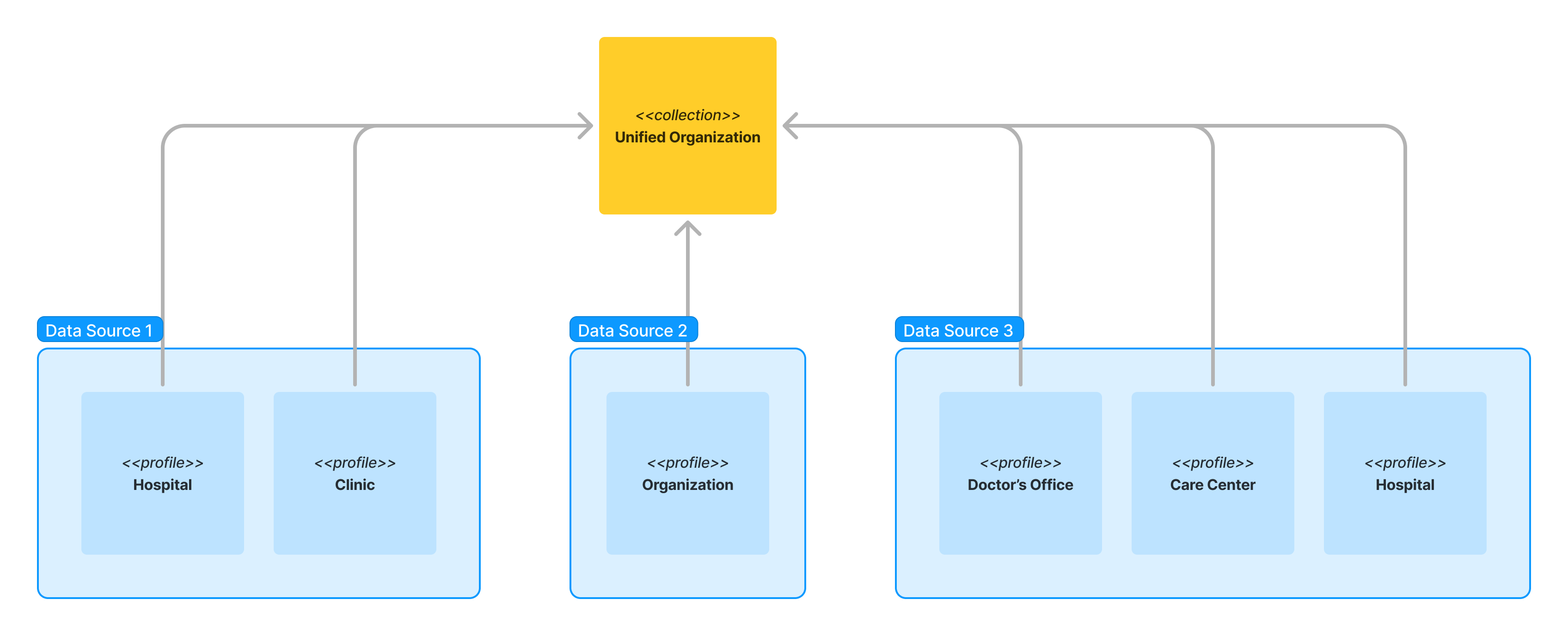
A **Clinic** created under data source 1 might also exist as an **Organization** in data source 2, and a **Doctor's Office** in data source 3. A resource collection indicates to the system that all source records created for these profiles can represent the same real-world entities.
To reliably and consistently resolve source records and link them together, resource collections use **Unified Records**. A unified record uniquely represents a real-world entity across the whole system. As such, it has a unique identifier that downstream applications can use to refer to it. A unified record also contains pointers and metadata about its association with every source record linked to it. This information can be leveraged by the system and its users to build, maintain, and reconcile the master data for this entity.
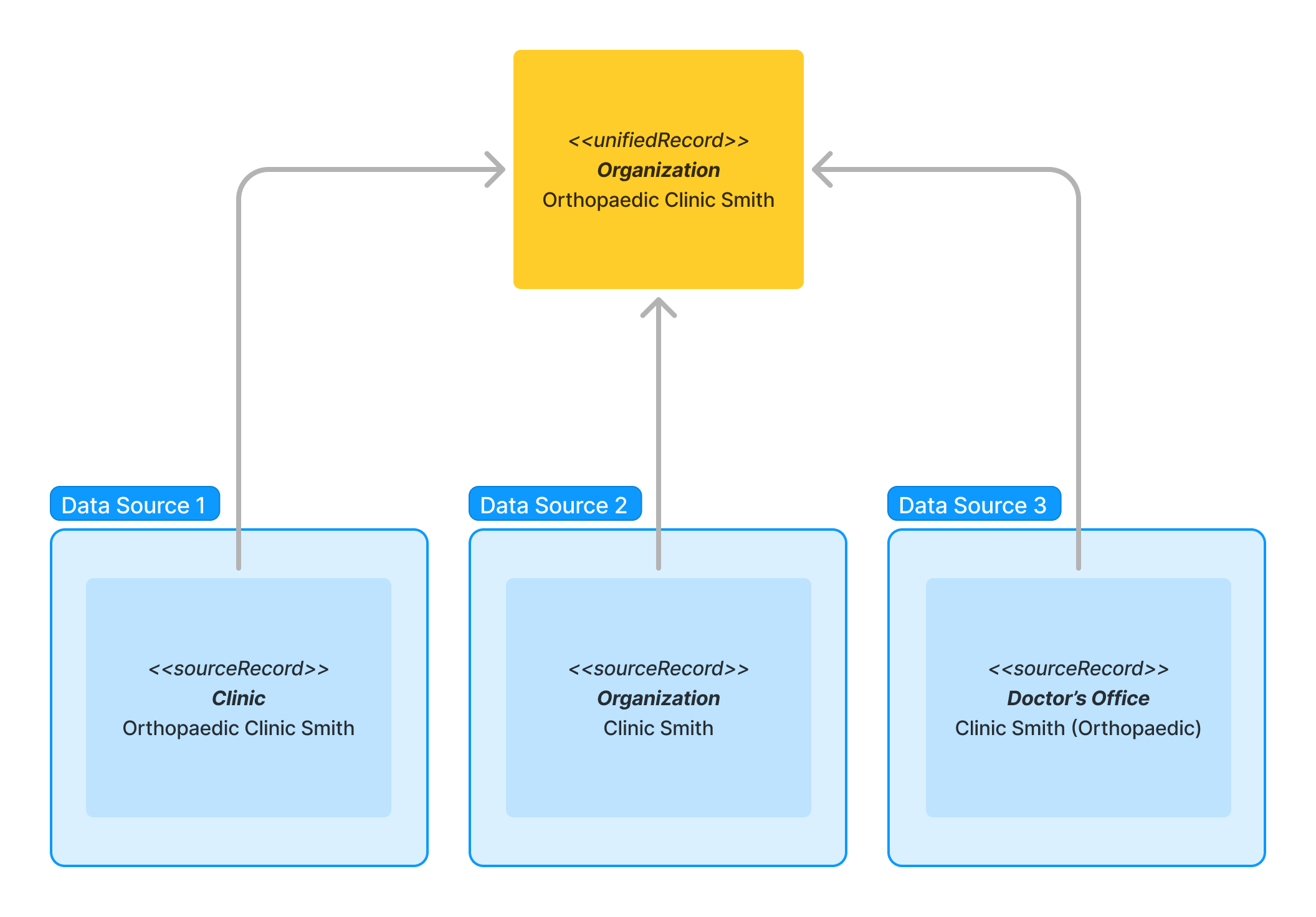
## How are records resolved?
To identify when similar source records are created within or across different data sources, the system uses comparison rules to compare records against one another effectively. **Resolution Rules** define:
1. **Resolution Properties** used for comparison and their mappings to the source profiles;
2. **Matchers** define the parameters of individual property comparison and;
3. **Resolvers** determine the outcome of the entire comparison process based on the individual property comparison outcome.
**Configurability**
Users configure resolution rules based on their business logic, adapting and optimizing for their data.
Because a unified record only contains identifiers, metadata, and links to its source records but no actual properties, a special representation must be created to enable comparison. This representation is built by aggregating the properties from their linked source records. This means that when we compare an incoming source record to what is in the system, we try to match it to an aggregate representation of a unified record.
# Resolution Preview
Preview resolution outcomes before ingestion to validate rules and anticipate matches
# What is it?
When data is propagated to data sources to the Unified Data Model (UDM), our entity resolution process works behind the scenes to identify and link identical records from multiple different sources. Once the specific set of entity resolution rules are configured, this process happens automatically at ingestion time—the user cannot influence the result.
For most use cases, this approach works well. However, because there is limited visibility on the actions taken during ingestion time, it can be difficult to anticipate exactly how a record will be interpreted by the system. This tool offers a way to preview how entity resolution will behave _before_ data is submitted — helping you better understand and test the matching logic. While it can also support specific workflows such as preventing duplicate records or improving data quality, its primary purpose is to provide visibility into the resolution process.
# How does it work?
Before we can dive into how Entity Resolution Preview works, let’s get familiar with the configuration we’ll use as an example.
* We have 2 data sources, A and B, that represents 2 different systems we are sourcing data from
* Each data source contains `clinic` resources that contains a name and an address.
* We have an MDM collection to create a unified record of type `clinic` that has resolvers with matcher rules for an exact name and a partial address (same postal code, city, country and state).
Let’s say that there exists an MDM record of type `clinic` from Data Source A. We’d like to find out what would happen if we were to add a very similar clinic into Data Source B. In the following data, we can see that addresses are exactly the same but the name differs, which should give us a “possible match” outcome if we were to ingest it.
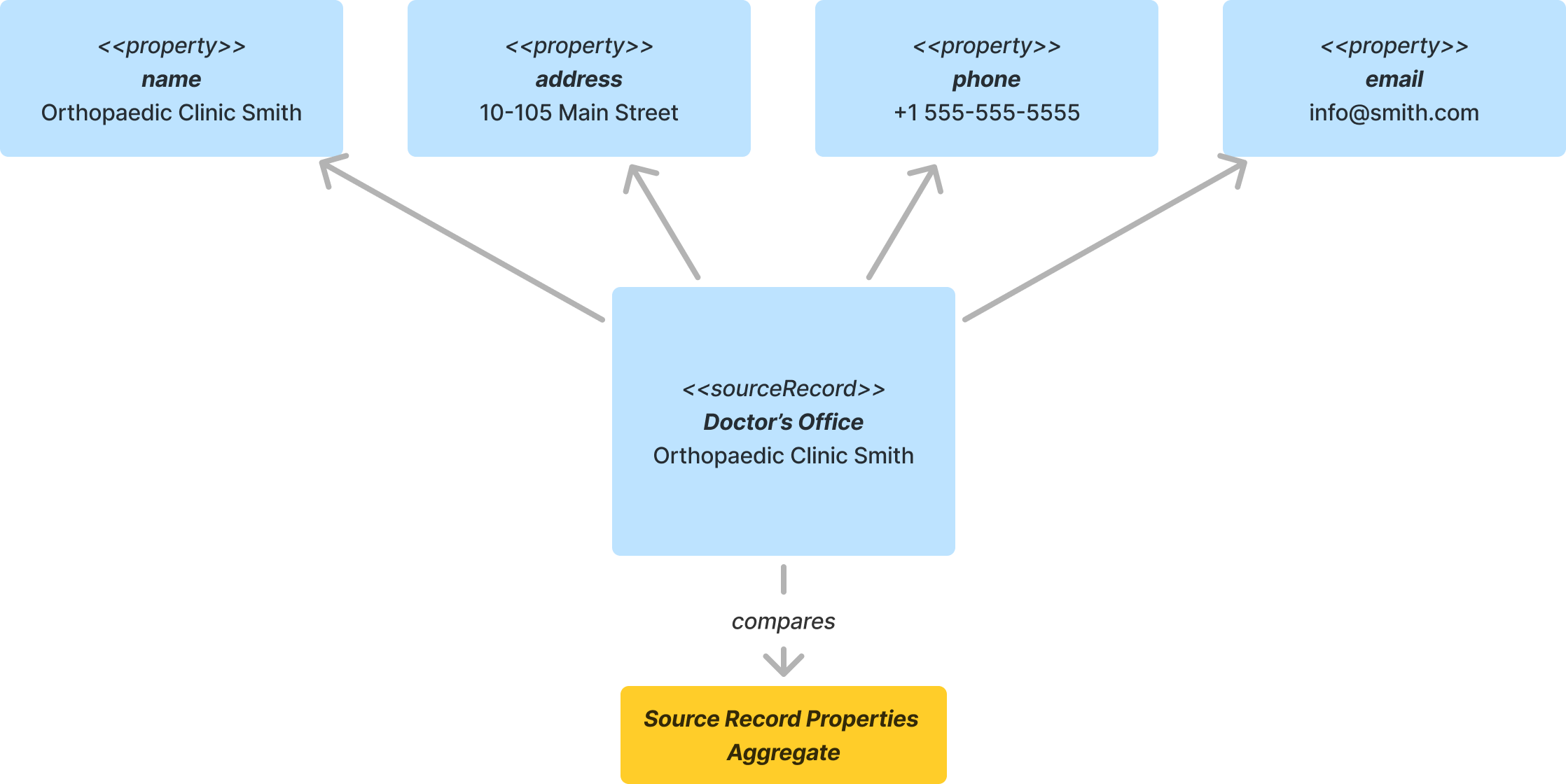
Using the Entity Resolution Preview feature, you can see the outcome before actually ingesting the new record. In this case, the data from the new clinic that is about to be ingested into Data Source B will compared to the MDM to find any existing records. Since there already exists a unified clinic record with a similar address, this will be flagged as a “possible match” due to the address having a match on the postal code, city, state and country.
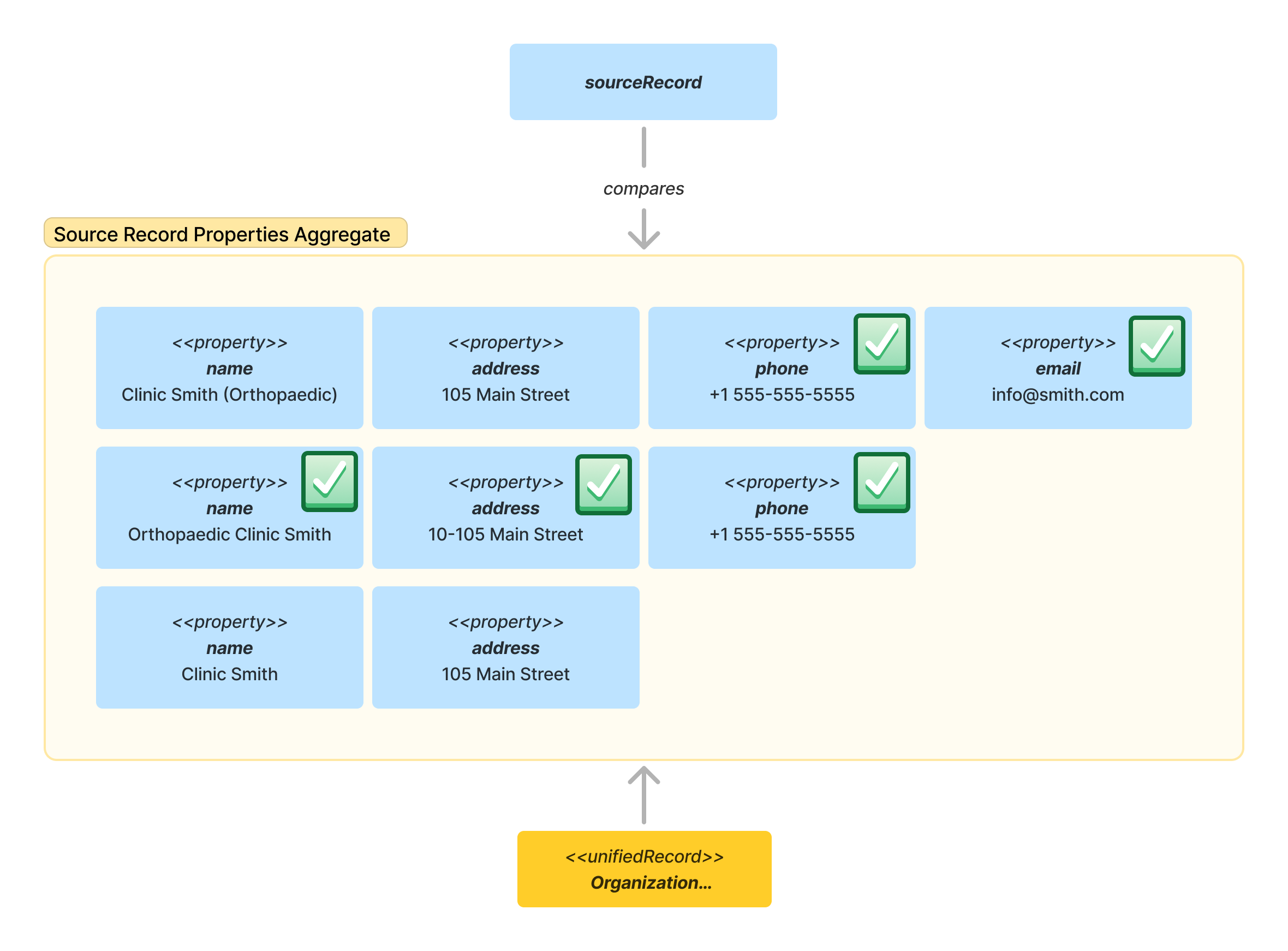
When calling the Entity Resolution Preview endpoint with the data you want to ingest into Data Source B, you will receive a response with a list of unified records that the system has matched using the configured resolution rules with their resolution outcome. This will give you insight on how the system will handle reconciling your incoming data and allow you to make an informed decision.
# List the data sources
List the data sources.
`GET /catalog/v1/sources`
# Get a data source
Get the data source with the given key.
`GET /catalog/v1/sources/{sourceKey}`
# Create a data source
Create a data source.
`PUT /catalog/v1/sources/{sourceKey}`
# List the data partitions
List the data partitions.
`GET /catalog/v1/partitions`
# Get a data partition
Get a data partition.
`GET /catalog/v1/partitions/{partitionKey}`
# Create a data partition
Create a data partition.
`PUT /catalog/v1/partitions/{partitionKey}`
# Retrieve a relationship from a data partition
Retrieve a relationship from a data partition.
`GET /partitions/{partitionKey}/v1/relationships/{relationshipType}/{relationshipId}`
# Retrieve a resource from a data partition
Retrieve a resource from a data partition.
`GET /partitions/{partitionKey}/v1/collections/{collectionKey}/resources/{resourceId}`
# Browse across a resource includes
Browse across a given resource's includes in the data partition.
In order to initiate a browse session, you can specifiy in the body the `v1BrowseIncludesRequest` object with the following properties:
- `includes`: The list of includes to browse. It can be used to include only a relationship (e.g. `worksAt`) or a relationship and the targeted resource (e.g. `worksAt.clinic`).
- `perPage`: The number of results to return per batch. Defaults to 100.
A browse session lives for 5 minutes, after which it will be automatically closed and a 404 error will be returned if you try to continue browsing.
The session is a rolling session, meaning that each new request will extend the session by 5 minutes from the time of the request.
A browse response contains the following properties:
- `hits`: An array of results that match the browse session.
- `meta`: An object containing metadata about the browse session, including the `cursor` and the total number of results available in the browse session.
You should use the `hits` length to check if there are more results to browse.
If `hits > 0` is true, you can use the `meta.cursor` to fetch the next batch of results.
If `hits > 0` is false, it means that you have reached the end of the browse session and there are no more results to browse.
`POST /partitions/{partitionKey}/v1/collections/{collectionKey}/resources/{resourceId}/browse-includes`
# Search resources of a specific collection in the data partition
Search resources of a specific collection in the data partition.
`POST /partitions/{partitionKey}/v1/collections/{collectionKey}/query`
# Search relationships of a specific type in the data partition
Search relationships of a specific type in the data partition.
`POST /partitions/{partitionKey}/v1/relationships/{relationshipType}/query`
# Search accross resource or relationship collections in the data partition
Search across resource or relationship collections in the data partition.
This endpoint only accepts federated search paths, which means that one using an operator it expects the collection type and collection key to be specified in the path.
For example, `resources..`. Filters, sorting, aggregations and highlighting use the same federated path syntax.
`POST /partitions/{partitionKey}/v1/federated/{collectionKeys}/query`
# Run multiple queries
Execute several queries within a single request. It is possible to send multiple query items, where each of the item can be either a regular query or a federated query.
To trigger a federated query, one must specify more then one collection key in the item.
`POST /partitions/{partitionKey}/v1/queries`
# Browse accross resource or relationship collections in the data partition
Browse across resource or relationship collections in the data partition.
This endpoint only accept federated search paths, which means that when using an operator it expects the collection type and collection key to be specified in the path.
For example, `resources..`.
In order to initiate a browse session, you can specifiy in the body the `v1BrowseParameters` object with the following properties:
- `filter`: A filter to apply to the browse session. Can contain any valid search operators (all except KNN).
- `perPage`: The number of results to return per batch. Defaults to 100.
Once the browse session is initiated, you can use the `cursor` returned in the response to continue browsing through the results.
The `cursor` is a string that keeps track of the current position in the browse session and can be used to fetch the next batch of results.
A browse session lives for 5 minutes, after which it will be automatically closed and a 404 error will be returned if you try to continue browsing.
The session is a rolling session, meanining that each new request will extend the session by 5 minutes from the time of the request.
A browse response contains the following properties:
- `hits`: An array of results that match the browse session.
- `meta`: An object containing metadata about the browse session, including the `cursor` and the total number of results available in the browse session.
You should use the `hits` length to check if there are more results to browse.
If `hits > 0` is true, you can use the `meta.cursor` to fetch the next batch of results.
If `hits > 0` is false, it means that you have reached the end of the browse session and there are no more results to browse.
`POST /partitions/{partitionKey}/v1/browse`
# List collections in the MDM
List collections in the MDM.
`GET /mdm/v1/collections`
# Get a collection in the MDM
Get the collection with given key in the MDM.
`GET /mdm/v1/collections/{collectionKey}`
# Create a collection in the MDM
Create a collection in the MDM.
`PUT /mdm/v1/collections/{collectionKey}`
# Get the collection profile
Get the profile for the given collection key.
`GET /mdm/v1/collections/{collectionKey}/profile`
# Execute a entity resolution preview for a given set of data (resolution properties) and identifiers
This endpoint allows you to preview/simulate the outcome of the entity resolution process for the given collection.
It returns a list of hits/matches to unified records in the system based the resolution rule of the collection, using the provided data and identifiers.
Use this endpoint to understand how the entity resolution process would behave when injecting a record into the collection, helping you to understand the result on the system.
Note: Entity resolution first checks for duplicate identifiers already present in the system (unified records) and then applies the resolution rule to find matches.
Therefore if matches are found based on identifiers, the resolution properties are ignored.
`POST /mdm/v1/collections/{collectionKey}/entity-resolution/preview`
# Retrieve a unified resource from mdm collection using its id
Retrieve a unified resource from mdm collection using its id.
`GET /mdm/v1/collections/{collectionKey}/resources/{resourceId}`
# List relationship definitions in the mdm
List relationship definitions in the mdm.
`GET /mdm/v1/relationship-definitions`
# Get a relationship definition from the mdm
Get a relationship definition from the mdm.
`GET /mdm/v1/relationship-definitions/{relationshipDefinitionKey}`
# Bulk create, upsert, or delete relationships
Bulk create, upsert, or delete relationships. The request body should contain a list of operations.
All operations will be processed even if some of them fail.
`POST /sources/{sourceKey}/v1/relationships/bulk`
# Create a relationship between two resources in the registry
Create a relationship between two resources in the registry.
`POST /sources/{sourceKey}/v1/relationships/{relationshipType}`
# Get a relationship from the registry
Get a relationship from the registry.
`GET /sources/{sourceKey}/v1/relationships/{relationshipType}/{id}`
# Update a relationship between two resources in the registry
Update a relationship between two resources in the registry.
The `from` and `to` fields in the body are ignored in favor of respecting the `id` path argument.
`PATCH /sources/{sourceKey}/v1/relationships/{relationshipType}/{id}`
# Delete a relationship between two resources in the registry
Delete a relationship between two resources in the registry.
`DELETE /sources/{sourceKey}/v1/relationships/{relationshipType}/{id}`
# Bulk create, upsert, or delete resources
Bulk create, upsert, or delete resources. The request body should contain a list of operations.
All operations will be processed even if some of them fail.
`POST /sources/{sourceKey}/v1/resources/bulk`
# Create a resource in the registry
Create a resource in the registry.
`POST /sources/{sourceKey}/v1/resources/{resourceType}`
# Get a resource from the registry
Get a resource from the registry.
`GET /sources/{sourceKey}/v1/resources/{resourceType}/{id}`
# Delete a resource from the registry
Delete a resource from the registry.
`DELETE /sources/{sourceKey}/v1/resources/{resourceType}/{id}`
# Upsert a resource in the registry
Upsert a resource in the registry.
`PUT /sources/{sourceKey}/v1/resources/{resourceType}/{id}`
# Create a contained resource in registry
Create a contained resource in registry.
`POST /sources/{sourceKey}/v1/resources/{resourceType}/{id}/{containKey}`
# Get a contain resource from the registry
Get a contain resource from the registry.
`GET /sources/{sourceKey}/v1/resources/{resourceType}/{id}/{containKey}/{containedResourceId}`
# Delete a contained resource in the registry
Delete a contained resource in the registry.
`DELETE /sources/{sourceKey}/v1/resources/{resourceType}/{id}/{containKey}/{containedResourceId}`
# Upsert a contained resource in the registry
Upsert a contained resource in the registry.
`PUT /sources/{sourceKey}/v1/resources/{resourceType}/{id}/{containKey}/{containedResourceId}`
# List all collections in a source
List all collections in a registry.
`GET /sources/{sourceKey}/v1/collections`
# Get a Collection from the registry
Get a Collection from the registry.
`GET /sources/{sourceKey}/v1/collections/{collectionKey}`
# Create or update a registry collection
Create or update a registry collection.
`PUT /sources/{sourceKey}/v1/collections/{collectionKey}`
# Search accross resource or relationship collections in the registry
Search across resource or relationship collections in the registry.
This endpoint suppport both regular and federated search depending on the number of collection keys specified in the path.
If the search is done on one multiple collections are specified, it must use federated search paths. This means that operators expect the collection type and collection key to be specified in the path.
For example, `resources..`.
If the search is done on a single collection, both regular and federated search paths are supported.
`POST /sources/{sourceKey}/v1/collections/{collectionKeys}/query`
# Run multiple queries
Execute several queries within a single request. It is possible to send multiple query items, where each of the item can be either a regular query or a federated query.
To trigger a federated query, one must specify more then one collection key in the item.
`POST /sources/{sourceKey}/v1/queries`
# Browse accross resource or relationship collections in the registry
Browse across resource or relationship collections in the registry.
This endpoint only accept federated search paths, which means that when using an operator it expects the collection type and collection key to be specified in the path.
For example, `resources..`.
In order to initiate a browse session, you can specifiy in the body the `v1BrowseParameters` object with the following properties:
- `filter`: A filter to apply to the browse session. Can contain any valid search operators (all except KNN).
- `perPage`: The number of results to return per batch. Defaults to 100.
Once the browse session is initiated, you can use the `cursor` returned in the response to continue browsing through the results.
The `cursor` is a string that keeps track of the current position in the browse session and can be used to fetch the next batch of results.
A browse session lives for 5 minutes, after which it will be automatically closed and a 404 error will be returned if you try to continue browsing.
The session is a rolling session, meanining that each new request will extend the session by 5 minutes from the time of the request.
A browse response contains the following properties:
- `hits`: An array of results that match the browse session.
- `meta`: An object containing metadata about the browse session, including the `cursor` and the total number of results available in the browse session.
You should use the `hits` length to check if there are more results to browse.
If `hits > 0` is true, you can use the `meta.cursor` to fetch the next batch of results.
If `hits > 0` is false, it means that you have reached the end of the browse session and there are no more results to browse.
`POST /sources/{sourceKey}/v1/browse`
# List purge operations
List purge operations.
`GET /sources/{sourceKey}/v1/purge`
# Purge operation request for resources or relationships
Purge operation request for resources or relationships.
`POST /sources/{sourceKey}/v1/purge`
# Get the result of a purge request
Get the result of a purge request.
`GET /sources/{sourceKey}/v1/purge/{taskId}`
# Bundle resource and relationship operations to be processed
Send a bundle of operations, including resource and relationship operations, to be processed atomically by the system.
Notes:
- Order of Processing: Resource operations are executed first, followed by relationship operations.
- Atomicity: The system processes the entire bundle as a single atomic transaction.
- If all operations succeed, the changes are committed.
- If any operation fails, all operations are rolled back, ensuring no partial changes.
`POST /sources/{sourceKey}/v1/bundle`
# Get a pipeline execution
Get a pipeline execution.
`GET /sources/{sourceKey}/v1/pipelines/executions/{pipelineExecutionId}`
# Query pipeline executions
Query the pipeline executions of a source.
The fields that can be used to filter or sort pipeline executions are:
- `id`: The pipeline execution id.
- `pipelineDefinitionId`: The pipeline definition id.
- `createdAt`: The pipeline execution creation timestamp.
- `updatedAt`: The pipeline execution last update timestamp.
- `status`: The pipeline execution status.
- `operation.action`: The action of the operation that triggered the pipeline execution.
- `operation.taskId`: The id of the task that triggered the pipeline execution.
- `operation.target.targetType`: The type of the target that triggered the pipeline execution. It can be 'RESOURCE' or 'RELATIONSHIP'.
- `operation.target.type`: The type of the resource or relationship that triggered the pipeline execution.
- `operation.target.id`: The id of the resource or relationship that triggered the pipeline execution.
- `reviewAssignment.reviewerId`: The id of the reviewer assigned to review the operation that triggered the pipeline execution, if any. Note: this field is only available as a filter, not as a sort field. It also only supports the equality operator.
`POST /sources/{sourceKey}/v1/pipelines/query`
# Get a task from the registry
Get the operation receipts related to a task id.
`GET /sources/{sourceKey}/v1/tasks/{taskId}`
# Get the history for a record or relationship
Retrieves a list of all operations performed on a specific source entity (record or relationship).
Results can be paginated and filtered by a date range.
`GET /sources/{sourceKey}/v1/history/{collectionType}/{collectionKey}/{itemId}/operations`
# Get a specific history item
Get a single version history entry by its operation ID.
The full data payload of the entity at that point in time can optionally be included.
`GET /sources/{sourceKey}/v1/history/{collectionType}/{collectionKey}/{itemId}/operations/{operationId}`
# List all the vocabularies in the terminology
List all the vocabularies in the terminology.
`GET /terminology/v1/vocabularies`
# Get a vocabulary from the terminology
Get a vocabulary from the terminology.
`GET /terminology/v1/vocabularies/{vocabularyKey}`
# Delete a vocabulary from the terminology
Delete a vocabulary from the terminology.
`DELETE /terminology/v1/vocabularies/{vocabularyKey}`
# Upsert a vocabulary in the terminology
Upsert a vocabulary in the terminology.
`PUT /terminology/v1/vocabularies/{vocabularyKey}`
# Bulk upsert or delete vocabularies
Bulk upsert or delete vocabularies.
Bulk operations are processed synchronously.
`POST /terminology/v1/vocabularies/bulk`
# Get a concept from a vocabulary
Get a concept from a vocabulary.
`GET /terminology/v1/vocabularies/{vocabularyKey}/concepts/{conceptCode}`
# Delete a concept from a vocabulary
Delete a concept from a vocabulary.
`DELETE /terminology/v1/vocabularies/{vocabularyKey}/concepts/{conceptCode}`
# Upsert a concept in a vocabulary
Upsert a concept in a vocabulary.
`PUT /terminology/v1/vocabularies/{vocabularyKey}/concepts/{conceptCode}`
# Bulk upsert, update or delete concepts
Bulk upsert, update or delete concepts.
Bulk operations are processed synchronously.
`POST /terminology/v1/vocabularies/{vocabularyKey}/concepts/bulk`
# Search for concepts in the terminology
Search for concepts in the terminology.
`POST /terminology/v1/vocabularies/{vocabularyKey}/concepts/query`
# Bulk assign reviews
Assign one or more reviews to a user.
Existing assignments are overwritten.
`POST /operations/v1/review-assignments`
# Bulk unassign reviews
Remove the assignee from one or more reviews.
`DELETE /operations/v1/review-assignments`
# Get a review assignment
Get the review assignment for a specific operation.
`GET /operations/v1/review-assignments/{operationId}`